nickyc53
Participant
November 27, 2016
Answered

HELP!!! Can't roll back Premiere Pro 2017 to 2015

  • November 27, 2016
  • 2 replies
  • 2426 views

Really pissed with Premier Pro 2017.

I upgraded because a freelancer did a project in 2017

Couldn't hear audio.

Got that working..

Started a new project which went fine, now keeps crashing.

Can't roll back as Premier is not listed in the CC app as a previously installed app

Sorry but this is just rubbish,

Takes me back to the buggy days of version 1.0.

I've lost a day now/
    This topic has been closed for replies.
    Correct answer David Arbor

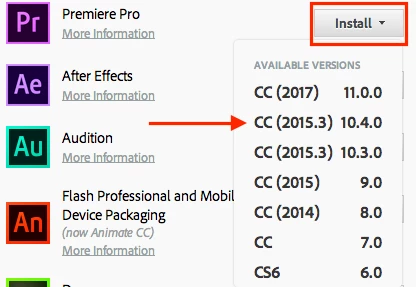
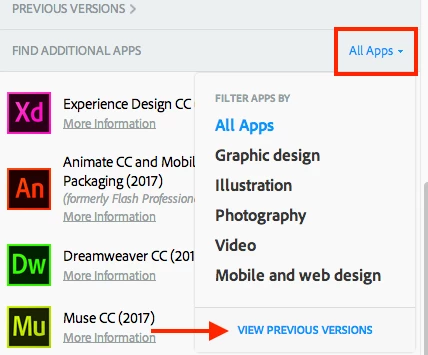
    The previous versions of apps are, counterintuitively, not listed in the Previous Versions section. That section only shows already installed previous versions. Here are two screenshots to show you how to find CC 2015, but the trick is scrolling down to where you filter by app category. Click that, choose "View Previous Versions," and then you can choose CC 2015 from the options next to Premiere.

    Edit: The order of the screenshots got swapped. This is fixed now.

    2 replies

    David ArborCorrect answer
    Inspiring
    November 28, 2016

    The previous versions of apps are, counterintuitively, not listed in the Previous Versions section. That section only shows already installed previous versions. Here are two screenshots to show you how to find CC 2015, but the trick is scrolling down to where you filter by app category. Click that, choose "View Previous Versions," and then you can choose CC 2015 from the options next to Premiere.

    Edit: The order of the screenshots got swapped. This is fixed now.

    Participant
    December 1, 2016

    When I attempt your fix, the only versions that show up in the previous versions are cc, and cc6.  Where are the others?

    Inspiring
    December 1, 2016

    Can you post a screenshot (or multiple ones) of your entire CC Apps tab with everything expanded? Also, what country are you in? I recall that not all previously installed apps are available for all countries, but I'm pretty sure that was mostly a CS6 thing, and not a Creative Cloud version thing.

    Also, what OS are you on? If it's MacOS, can you post a screenshot of your Applications folder (near the top with all the Adobe apps) and if it's Windows can you do the same for your Program Files folder?

    Bruce Bullis
    Legend
    November 28, 2016

    [Moving elsewhere, as this has nothing to do with APIs or SDKs...]