Participant
November 11, 2017
Answered

Help! Timeline disappeared!

  • November 11, 2017
  • 18 replies
  • 177426 views

Hello, I was just editing, I pressed some key and my timeline disappeared! Not the timeline window itself but the actual sequence. To make matters worse I can't find the sequence in my project to reopen it!

Help is much appreciated.

Correct answer Ann Bens

18 replies

Participant
May 31, 2018

Is it possible you have multiple project files open at once?

Ann Bens
Community Expert
Community Expert
May 31, 2018

Yes that is possible with the newest version.

Participant
May 31, 2018

I mean, that might be why the sequence would have seemingly disappeared from the bin, if multiple project bins were open.

Participant
May 31, 2018

@My timeline disappeared and I wanted to vomit, but I figured how to get it back!!! This isn't the best fix, but I'm working again (someone else can explain how this worked or how to do it properly).

I noticed that even though my timeline was empty my clips were still showing as being used somewhere . . . so that made me feel better.

1. Click the "Video Used" icon

2. Select the sequence where it is used!

Please excuse my use of Paint. I've got work to do and no time to make it look pretty. You're welcome.

Participant
May 31, 2018

Oh man, you saved my life bud. Thanks for the Tip!

josephinea33015128
Participant
April 22, 2018

Same issue just happened after a software update. I saved a new project, which had several video clips on the timeline/sequence, then I saved the project and exited the program. Then, I updated the software. After the software update, I reopened the program and my project to find that its timeline is empty. Luckily, I hadn't really dug into editing yet. The video clips I used do have the notation that "video used 1 time".

I created duplicate projects with the same videos and dragged them to the timeline, then saved, then exited the program. I re-opened the program to find that the duplicate project's timeline is gone. All of the suggestions above don't and haven't worked.

If someone can troubleshoot this, I'd appreciate it because the only other option is to do all my editing in one go without ever closing out of the program. Saving every minute does nothing to preserve the editing or timeline.

Legend
April 22, 2018

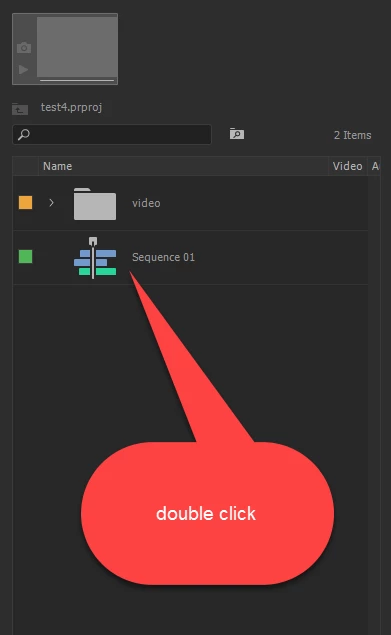
Your sequences aren't gone, they're just closed.  You need to open them from the Project panel.

Participant
February 7, 2018

SAME PROBLEM!!

Alleyne Media
Participant
September 20, 2020

So this just happened to me and I don't see the sequence in the project panel


Alleyne Media
Participant
September 20, 2020

I read throught the comments and I think I may have to restart my entire sequence. I don't know why/ how this happened I don't want it to happen again but I don't know how to prevent it from happening. 


Ive tried all the suggestions and I cant seem to locate my sequence. Thats hours of work down the drain, timelines pushed back and I don't know how to prevent this from happening again. These complaints happened two years ago, why is this still happening. I cant be the only only. PLEASE HELP!

ecatemolli
Participant
January 13, 2018

I also loose totally the timeline when I save the project on Premiere cc 2018

I even attempted to export it as XML (which now is only FINALCUT XML)

As I reopen it the whole editing appears a green continue line and the clips cant be edited or adjusted.

This is really bothersome and it did not happen with the previous versions.

It happens now as I updated to ElCapitan and version 2018

Is it a bug or what?

Legend
January 13, 2018

You just need to open the sequence.  Double-click on it from the bin.

And do read the manual.  What you're looking at with the XML is a nested sequence.

Adobe Premiere Pro Learn & Support

ecatemolli
Participant
January 17, 2018

I do what you suggest but the timeline is just not there

I sent the project to a friend with CC2018 on Mac and he is able to see it

We use the same system ELCAPITAN and the same version is there something in the preferences I should set up?

Googling around I learned this seems to be a bug when the user SAVE AS but I never did it.

I also followed another suggestion; open the app pressing either option (ALT) or Shift Option to reset the preferences to the original state

Yet even this did nothing

You suggest to read the Manual, but where in the manual they suggest what to do when the timeline disappears?

This never ever happened in the previous version. Usually if an upgrade or update gives such an important issue it's called a bug.

I am loosing hours of work and the trust of the people who give me work

I have no external plug ins and my system is totally clean as from Apple original ...

I wonder if there is something I should do before dropping Premiere for good

Adobe is a serious company and this is unacceptble and I am certainly not the only one with this problem

Participant
December 6, 2017

Same problem! Send Help!

Legend
November 11, 2017

If the sequence isn't in the Project panel, then you must have deleted it.  Try a CTL-Z and whatever else you do, don't close the project with it gone.

Known Participant
November 11, 2017

Have you tried going to "window" "Workspaces" "Reset to saved layout"?

Participant
January 31, 2021

Thank you! That actually fixed it

Participant
May 23, 2021

Yes! It did! I was so stressed!