Help translating Plug-in Colour Settings, to Adobe Lumetri Settings/Presets?
Hi,
I have trial plug-ins that are either not affordable, or use more resource then PC can provide.
Looking for help to translate plugins to the closest standard premiere settings posible.
Or surgestions for other plug-ins.
------------------------------------------
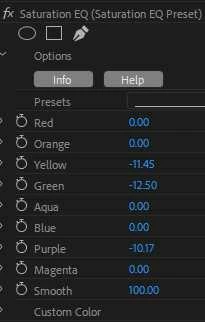
Saturation EQ (Modified Reduce Greens Settings)
Red 0
Orange 0
Yellow -11.45
Green -12.5
Aqua 0
Blue 0
Purple -10.17
Magenta 0
Smooth 100
------------------------------------------
Selective Hue (Modified De-Yellow Skin Settings)
Source Color (As original De-Yellow Skin Setting) #f2d1b1 https://www.color-hex.com/color/f2d1b1
>Target Lumin -4
>Target Saturation 50
>Target Hue -10
Range 100
Hue 2.6
Saturation -20
Brightness 4
Soften 100
Strength 40
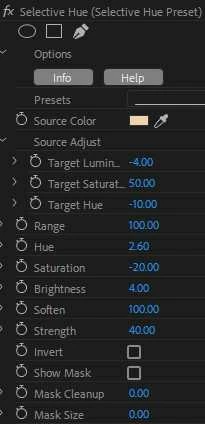
Note: The Source Color used by Plug-in for "De-Yellow Skin" can be eyedropped from effects control plugin Swatch, using Lumetri eyedropper.
------------------------------------------
Saturation EQ Preset
https://www.udrop.com/1jgK/Saturation_EQ_Preset.prfpset
Selective Hue Preset
https://www.udrop.com/1jgL/Selective_Hue_Preset.prfpset
Thanks.
Note for Neil: I can work very good with numbers where you can flick back and forth to see change and fine tune, but do not like the HSL Curves at all. I cannot control HSL Curves with the fine movement required. The HSL curves do not functionaly change video in the way I want. Cannot go wrong with hard numbers!
 AdChoices