
Participant
January 8, 2020
Resuelto

Help with an animated circular text

  • January 8, 2020
  • 2 respuestas
  • 2585 visualizaciones

Hi,

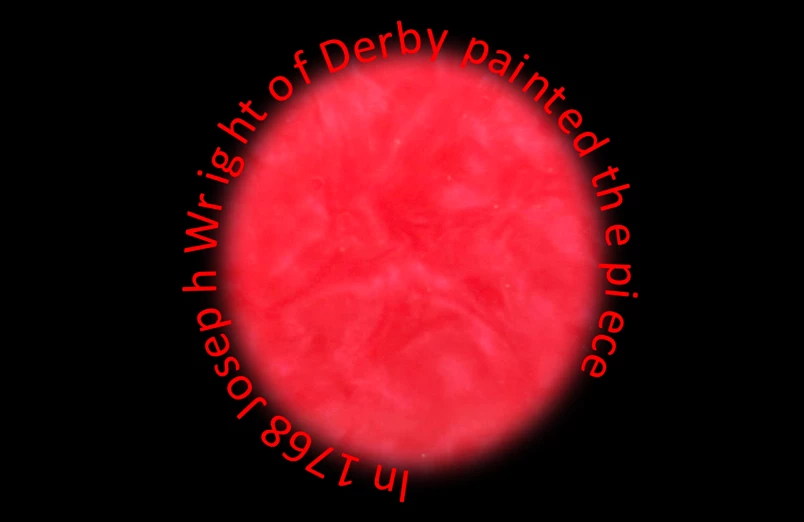
I am tryinng to have the subtitles for a video I am doing rotate around a circle. I want new words originating from the same place where old words are being hidden. All the tutorials I have found online make a static picture that they then use a radial wipe to reveal the words, but I want to have a text slowly being revealed and have distortion animations on the letters individually. Would anyone have any idea on how to achieve this ?Any help would be much appreciated.

Rory
Este tema ha sido cerrado para respuestas.
Mejor respuesta de Kevin J. Monahan Jr.

Rory,

See if this tutorial by Angie Taylor will help you: https://angietaylor.co.uk/tip-wrapping-text-around-a-circle-in-after-effects/


Cheers,
Kevin

2 respuestas

Participant
January 9, 2020

Oh no sorry this did not answer my question. The image I posted is my image. I want to animate the text so that it rotates arounnd the circle. I intend this to show the subtitles of the video. With new words originating from a point in the line and terminnating at the opposite side of that point. It would be like scrolling text across the screen but around the circle

Participating Frequently
May 12, 2021

can't find this anywhere.  I want a sentence to roam around the page like a catipillar

Kevin J. Monahan Jr.
Community Manager
Community Manager
May 12, 2021

Hi Trish,

Yes, sorry. This effect cannot be accomplished simply in Premiere Pro. I would still recommend After Effects for any "path text" effect, which is what you seem to be describing. Do you have After Effects?


Thanks,
Kevin

Kevin Monahan - Sr. Community and Engagement Strategist – Adobe Pro Video and Audio
Kevin J. Monahan Jr.
Community Manager
Community Manager
January 8, 2020

Hey Rory,

Do you have access to After Effects via Creative Cloud, or only Premiere Pro? If you have it, you should do this text animation there. It's pretty simple. Let us know.


Thanks,
Kevin

Kevin Monahan - Sr. Community and Engagement Strategist – Adobe Pro Video and Audio
Participant
January 8, 2020
Yes I do have access to after effects !
Kevin J. Monahan Jr.
Community Manager
Community Manager
January 8, 2020

Rory,

See if this tutorial by Angie Taylor will help you: https://angietaylor.co.uk/tip-wrapping-text-around-a-circle-in-after-effects/


Cheers,
Kevin

Kevin Monahan - Sr. Community and Engagement Strategist – Adobe Pro Video and Audio