
Help with smart rendering? (new export window/adapt for my needs)
I'm trying to use the info at: https://community.adobe.com/t5/premiere-pro-discussions/faq-what-is-smart-rendering/td-p/10648488. A few questions about how to adapt this for my needs and the new version of Pr...
I have a Puget Systems build from 2019:
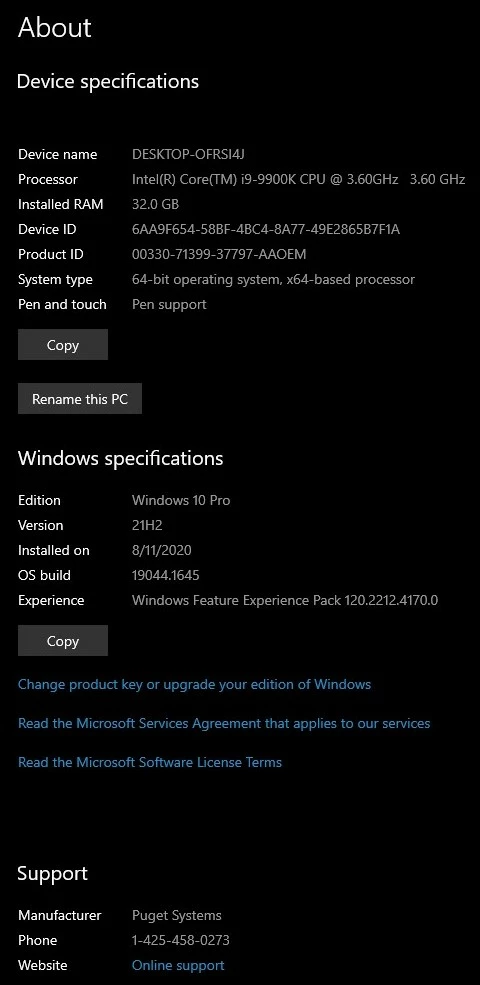
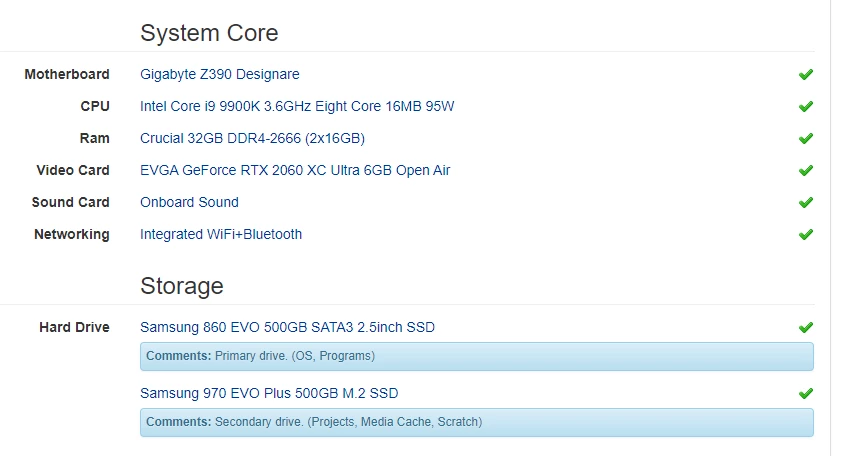
I make videos for Vimeo... although I use 4K media sometimes, the final export is never larger than 1080p. Also, I'm not a pro... just a music teacher who makes educational video. So much of my footage is shot with a phone or prosumer camera. I realize that it's VFR; however, Pr has never given me trouble with it.
I'm working on a timeline that's about 30 minutes long, and it requires some heavy green screen keying in AE. Exporting the final product is threatening to take perhaps 36 hours on my machine. If possible, I'd like to use the "smart rendering" workflow to speed this up. I realize this means using (for instance) ProRes review files, and then exporting as ProRes. I also realize that my computer will still take umpteen hours to render all that... but the advantage (I think?) is that it's spread out. Instead of starting my export from scratch, the rendering is all or mostly done bit by bit during each night, or when I walk away from the computer for breaks. Then the final export uses those renders and is fairly fast... that's the idea, right? Then, as suggested in the FAQ above, my first export will have to be a ProRes also. But then, AME should be able to turn that into the Vimeo 1080 preset fairly quickly. This is my wishful thinking plan.
I'm confused on two points right now: in the FAQ above, it mentions that sequence settings should match the footage precisely... what does that mean for me using the phone footage that I am? How exactly would I set that up?
Also: how do I set the export up in the new export window? Choosing "match sequence settings" doesn't seem to work...?
Thanks!
 AdChoices