



Answered
hide autosave folder in Production panel
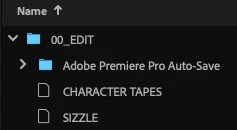
I have a Production where, in Scratch Disks, I'm pointing my auto save to "Same as Production". It appears to be putting autosaves (in Finder) in the folder each specific project is in. This is great.
I'd like to NOT have that auto save folder show up in the Production Panel in Premiere. I'm an Assistant Editor; when I hand this off to an editor, I'd rather not have them see the auto saves in the Production Panel (to prevent them from working within an autosaved version of a project).
How do I make the auto save folder not show up in the Production panel?

 AdChoices