Participating Frequently
August 5, 2020
Answered

Hod do I import VOB from a DVD?

  • August 5, 2020
  • 5 replies
  • 1836 views

My videos are on DVDs in VOB format. How do I edit in Premier? The import selection is grayed out.

This topic has been closed for replies.
Correct answer Averdahl

Aha, o.k! That has nothing to to with the .vob file.


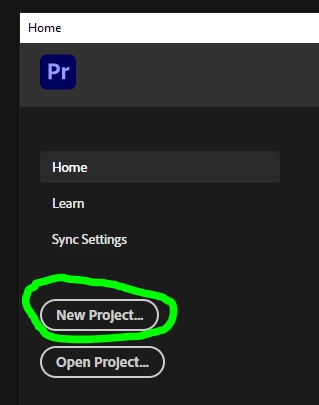
To work with any media in Premiere Pro you must create a new Project in order to being able to import anyting at all. In the same menu, go to New > New Project to create a new Project. Or, click the New Project button in the Home screen you see each time you launch Premiere Pro. Give it a name and save it somewhere on your computer. After you have done that, go to File > Import.

Premiere Pro is project based. All work you do are done in projects. So in order to even being able to import any media you must create a project. 


Does it work now? 🙂


5 replies

Stan Jones
Community Expert
Community Expert
August 7, 2020

I laughed out loud! I was convinced this was not a "vob is the problem," but Averdahl needed to show which "import" option was greyed out. I was still too far into the "box."


mbard, I suggest marking Averdahl's response that starts with "Aha..." as the correct answer.


Stan

Community Expert
August 6, 2020

You might want to try to import through Media Browser.

Averdahl
Community Expert
Community Expert
August 6, 2020

The import selection is grayed out.


Show us with a screen dump how a greyed out import dialog looks. Use the button in the image below to upload. And, what exact version of Premiere Pro do you have? (Help > About Premiere Pro)


mbardAuthor
Participating Frequently
August 6, 2020

Premiere Pro 14.3.1

Averdahl
Community Expert
AverdahlCommunity ExpertCorrect answer
Community Expert
August 6, 2020

Aha, o.k! That has nothing to to with the .vob file.


To work with any media in Premiere Pro you must create a new Project in order to being able to import anyting at all. In the same menu, go to New > New Project to create a new Project. Or, click the New Project button in the Home screen you see each time you launch Premiere Pro. Give it a name and save it somewhere on your computer. After you have done that, go to File > Import.

Premiere Pro is project based. All work you do are done in projects. So in order to even being able to import any media you must create a project. 


Does it work now? 🙂


Stan Jones
Community Expert
Community Expert
August 5, 2020

Many VOBs cannot be imported to PR, and some, once imported, cannot be edited. But you should have the import option.


How are you importing?


Stan

mbardAuthor
Participating Frequently
August 6, 2020

Thought I could use file - import but it's grayed out so I don't know an alternative. Will look into handbrake.

mbardAuthor
Participating Frequently
August 6, 2020

What are the formats that work with premiere? I've got another converter but don't know whic of the options will work. It doesn't have the suggested h264

Legend
August 5, 2020

use handbrake to convert to a premiere friendly format like h264

https://handbrake.fr