Participating Frequently
February 10, 2021
Answered

How can I copy current the timecode more effectively

  • February 10, 2021
  • 2 replies
  • 2639 views

I have to go through a cut and look for VFX shots, then I mark them and I copy the Time code in point of each cut and paste it into a filemaker database (describing the shot, teh work to be done, duration etc. )


I manually click into the TC field, I copy, I change Application and I paste...

now filemaker is rather good with Apple script, so I can script the whole FM side, but is there a way to automatically get the TC from the current playhead position..  

Is Premiere scriptable somehow, could I at least make a keyboard shortcut for this ?


thx for any insight

J
Correct answer Bruce Bullis

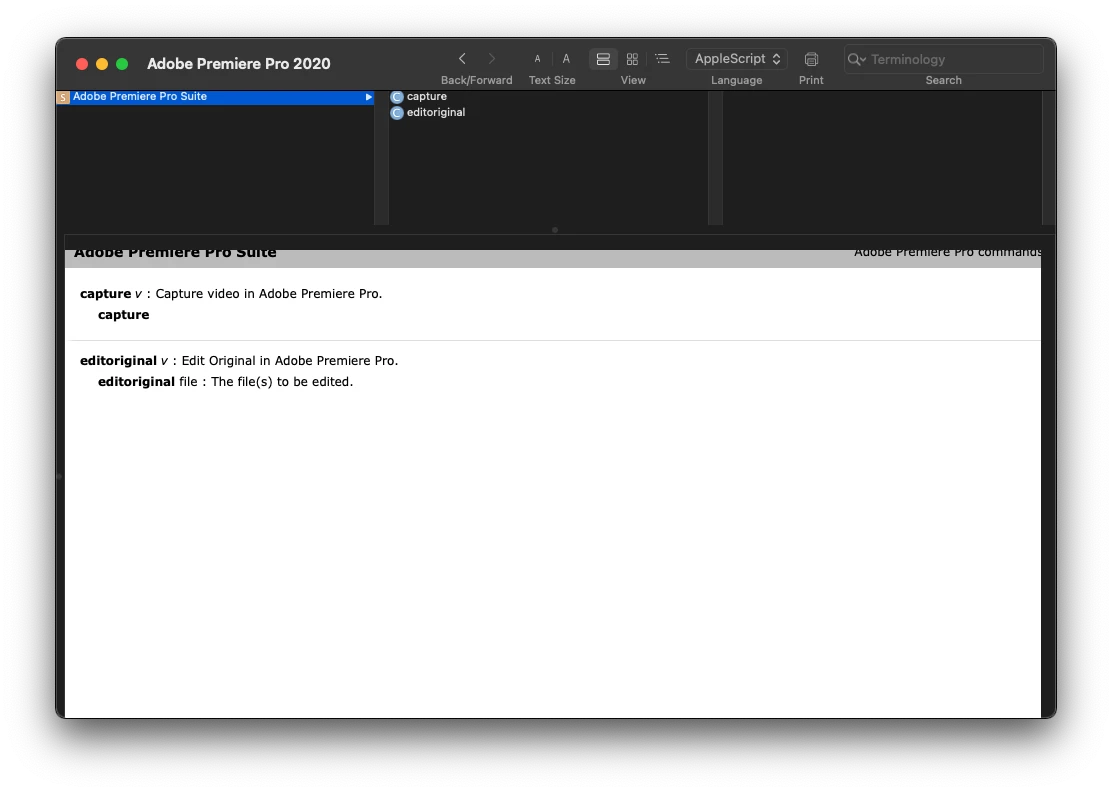
Well so far there is no Apple script...  as far as I can see the "dictionary" I can see from the Apple Script Editor is rather limited and has no function that makes sense to my issue.

From within FIlemaker I can trigger regular Apple scripts. so if Adobe would have had Apple script support I could set the playhead at the right point and trigger my FIlemaker script doing the rest...  alas no such luck.


PPro has a broad ExtendScript API, most commonly accessed from within CEP panels. The CTI (Current Time Indicator) position is available via that API. 

var currentTime = app.project.activeSequence.getPlayerPosition();


You can get the time in seconds, 'ticks' (254016000000 per second), or text, formatted using the current display settings.

var asString = currentTime.getFormatted();
var inSeconds = currentTime.seconds;


2 replies

Inspiring
February 10, 2021

Could you post a screen shot or short video of what you are doing?

Participating Frequently
February 10, 2021

Its quite easy, I click into the TC field, hit Copy and then change over to Filemaker and paste the TC into a field in my database. 


But I do this 100-200 times for eeach new cut version that comes out and for each Episode...  🙂

every time grab the mouse click the field, let go of the mouse and hit command-C

then change over to the otehr app etc...   if I had a way to do the copying with a script I could hit one key and it all happen automatically...


lazy me, I know...   🙂


Inspiring
February 10, 2021

I was hoping to see what the Apple Script was doing. I imagine you can make a feature request.

Participating Frequently
February 10, 2021

I forgot: obviously I looked into the Apple Script Editor and the Adobe Premiere vocabulary seems to be only 2 commands...