
Inspiring
May 23, 2024
Answered

How can I get Media Source Channel information from an audio clip in ExtendScript

  • May 23, 2024
  • 1 reply
  • 379 views

Where can I find the information displayed in the following view from within ExtendScript:
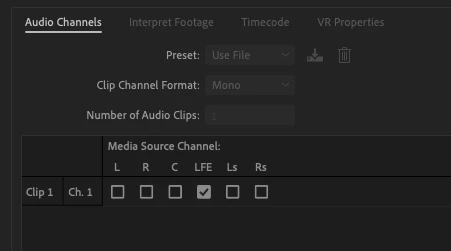
I've looked at projectItem.getAudioChannelMapping but that just gives me the total number of channels (audioClipsNumber) and a channel type (audioChannelsType:0) which I read as "mono". This was originally a single media item with 6 internal channels and I unlinked them to get to the view above. 

I've found other posts coming close to this topic but I don't need to "revert" anything to any kind of original setup. I just want to programatically see what the dialog window above is presenting. 

This topic has been closed for replies.
Correct answer Bruce Bullis

You're right, while you can set mappings for channels, there is no ExtendScript API that allows you to get the current channel's mapping. 

No further changes to PPro's ExtendScript API are planned or scheduled; such improvements would need to wait until we move to UXP extensibility; no dates available. 

1 reply

Bruce Bullis
Community Manager
Bruce BullisCommunity ManagerCorrect answer
Community Manager
May 23, 2024

You're right, while you can set mappings for channels, there is no ExtendScript API that allows you to get the current channel's mapping. 

No further changes to PPro's ExtendScript API are planned or scheduled; such improvements would need to wait until we move to UXP extensibility; no dates available. 

Inspiring
May 23, 2024

Ok thanks for the clarity on that.