
Participating Frequently
June 13, 2015
Answered

how can I loop timeline playback?

  • June 13, 2015
  • 4 replies
  • 96818 views

I am editing an audio file. Need to play around with equalizer settings and I want to set an IN & OUT point (which I have already done on the timeline), but now how do I get the timeline to loop between my IN/OUT points so that I can play with my EQ settings?
Correct answer Richard M Knight

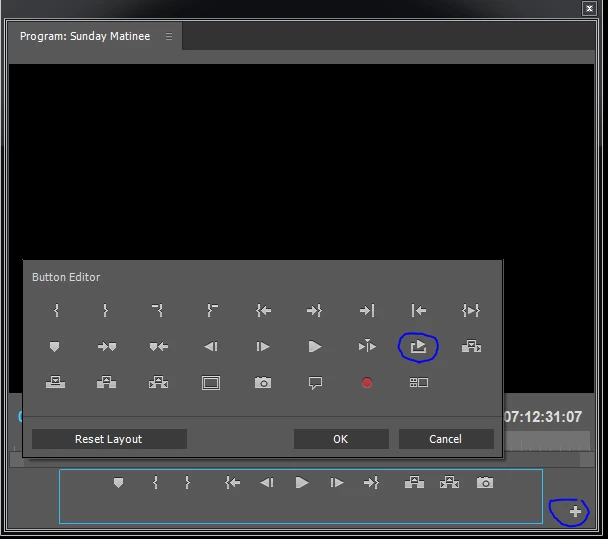
If you open up the 'add button' editor for the program monitor you will find a 'loop' button

4 replies

Participating Frequently
June 13, 2015

Thank you for your help, guys. I don't have a 'plus' symbol on my version of the Program Monitor, but was able to see the wrench icon. Under the menu of the wrench icon, I can see I had to select 'Loop'. Once I did that, I was able to loop between my IN/OUT points using CTL+L (loop shortcut). Exactly what I needed :-)

Ann Bens
Community Expert
Community Expert
June 13, 2015

If you check Show Transport Controls you will see your buttons (and the + sign) again.

Participating Frequently
June 13, 2015

Thanks Ann. I selected "Show Transport Controls" and now I see the controls at the bottom of the Program Monitor. However, when I click on the 'loop icon', nothing seems to happen. Maybe these controls don't apply to audio??? I am not working on a video project...only one media source: WAV file. It looks like I still need to use the wrench>Loop whenever I want to loop. And also do wrench>Loop to disable when I don't want to loop anymore. Seems like a pain. The shortcut key CTL+L isn't enabling or disabling looping on my timeline, either. Looks like I'm stuck doing it manually via the Program Monitor>Wrench>Loop every time.

R Neil Haugen
Legend
June 13, 2015

You control that in the Program Monitor ... you can say add the "Loop" icon to the icon controls in your Program Monitor Panel by 1) clicking the + in the lower right corner then 2) dragging the Loop icon to a spot on your Program Monitor controls section and click on it during playback, then going to the timeline or audio controls and working away.

Or ... while the Program monitor is highlighted with an in/out selected, it's Ctrl/Cmd-L to have it play a loop of the in/out selection. A simple keyboard short.

Neil

Everyone's mileage always varies ...
Legend
June 13, 2015

Click the + sign in the lower right of the Program Monitor.  You'll call up some extra icons you can add to your panel under the monitor.  One of them is the Loop switch.

Richard M KnightCommunity ExpertCorrect answer
Community Expert
June 13, 2015

If you open up the 'add button' editor for the program monitor you will find a 'loop' button