


Participating Frequently
June 9, 2025
Answered

How can I make the colors in Premier match my video source?

  • June 9, 2025
  • 2 replies
  • 573 views

Premier Pro 25.1.0

2023 Mac Studio with an Apple M2Max Chip and 64GB Memory running Sequoia 15.5


I've been using Premier Pro since 2019 learning basics in college and from there I am self-taught. I use Premier almost daily in my full-time position for simple video edits and have encountered an issue with color that came along with the 2025 update. I've been "limping" through the last 6 months trying different solutions I could find in these forums (at least what I could understand) and nothing seems to fix the issue. They seem to look okay once exported, but this issue has drastically slowed my editing process down as I am using a 3rd party app to edit color in the video then importing it in (this has been the best workaround for my needs and knowledge base). 


Today, I pulled an iphone video in and was flabbergasted, see the image below to see a side by side (left is in my video player and right is in Premier).
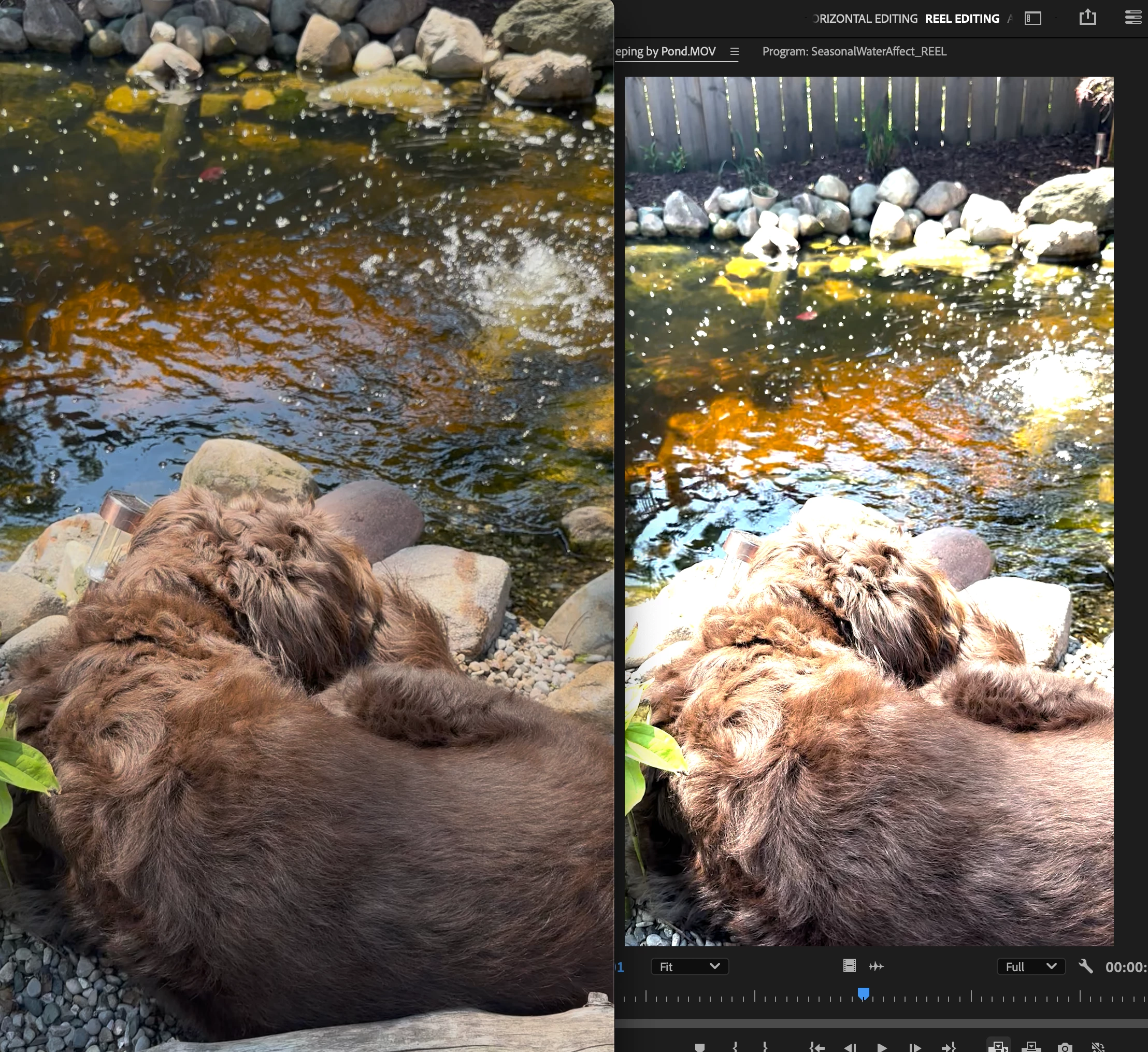
 

I'm hoping this is total user error and there's an easy solution. Please understand, I am not a pro and I'm not looking to be one, I am just looking for a fix to the horrible colors that are being shown by Premier.

Correct answer Ann Bens

Its all about color management.

2025 Premiere Color Management V25 2 - YouTube

Color management in Premiere Pro

2 replies

R Neil Haugen
Legend
June 9, 2025

Ann is right, it's all in proper user handling of the color management. Which is more complicated because we don't work in only one standard color capture setup anymore.


Your iPhone by default uses a form of HLG, hybrid log gamma, which is a form of "HDR", high dynamic range video capture and display.


That uses both different color primaries and has a greater range of brightness values than the older 'standard' SDR did.


So you need to pick whether you want to output from Premiere in HDR, probably HLG, or in SDR, the standard Rec.709. And then set Premiere's color management to map tonal (luminance) and color (chrominance) values to whichever you want to use.


That's what that information she gives, and "we", can help with.


Pick something, and ask. I and others can give specific help then.

Everyone's mileage always varies ...
Participating Frequently
June 10, 2025

I appreciate your help. I switched over to the "Rec. 709" and it helped tremendously with the video colors and I can play with them from here.


I've got a couple other questions that this has stirred up:

  1. Previously, I could pull all of my clips (15+ different sources) in and they would look the same as the original source clip. Am I correct in understanding that I will have to individually set the color space for each of these clips every time I use them into the project?
  2. For future shoots, I am reading online that its better to shoot with HDR toggled off on the iphone. Is this true? I have a few large shoots coming up and would like to make sure my iphone content is easier to use if it can be.


Thank you!

R Neil Haugen
Legend
June 10, 2025

1) No, if you have your settings correct, Premiere will perform a pretty slick algorithmic transform to Rec.709 for most log/HDR media. That's what auto detect log and auto tonemapping do, when both are active, and the sequence is set to Rec.709. The beauty of the new system is that once set for what you need, it both defaults to good choices and still allows user mods for specific things.


2) Many experienced people in video production do recommend turning off the HDR/HLG settings on most phones. Realistically, most screens out there still don't show HDR at all or if they do, it's only one or two of the competing/alternate forms ... and they even don't do that one they do well.


HDR is sadly still very much Wild Wild West. And as someone who works for/with/teaches pro colorists, this is frustrating. Yup.


Rec. 709/SDR still works quite well.

Everyone's mileage always varies ...
Ann Bens
Community Expert
Ann BensCommunity ExpertCorrect answer
Community Expert
June 9, 2025