Participant
June 22, 2025
Answered

How can i run jsx programmatically

  • June 22, 2025
  • 2 replies
  • 1934 views

Hi everyone,


I'm trying to run an ExtendScript (.jsx) file in Adobe Premiere Pro 2025,
but I can't find the Scripts menu that used to be under


Window → Utilities → Scripts in previous versions.

Or File -> Scripts


My setup:
- Adobe Premiere Pro 2025 (version 25.3.0)
- macOS Darwin 24.5.0
- Script location: /Users/[username]/Documents/Adobe/Premiere
Pro/25.0/Scripts/batch-xml-import-temp.jsx

What I've tried:
- Window menu - no Utilities submenu found
- Window → Extensions - no Scripts option
- File menu - no Scripts submenu
- Help → Search for "Scripts" - no relevant results


What I need:
I have a batch XML import ExtendScript that needs to be executed. 

If this is not supported anymore. What is the approach to solve this?

 

Correct answer Mathias Moehl

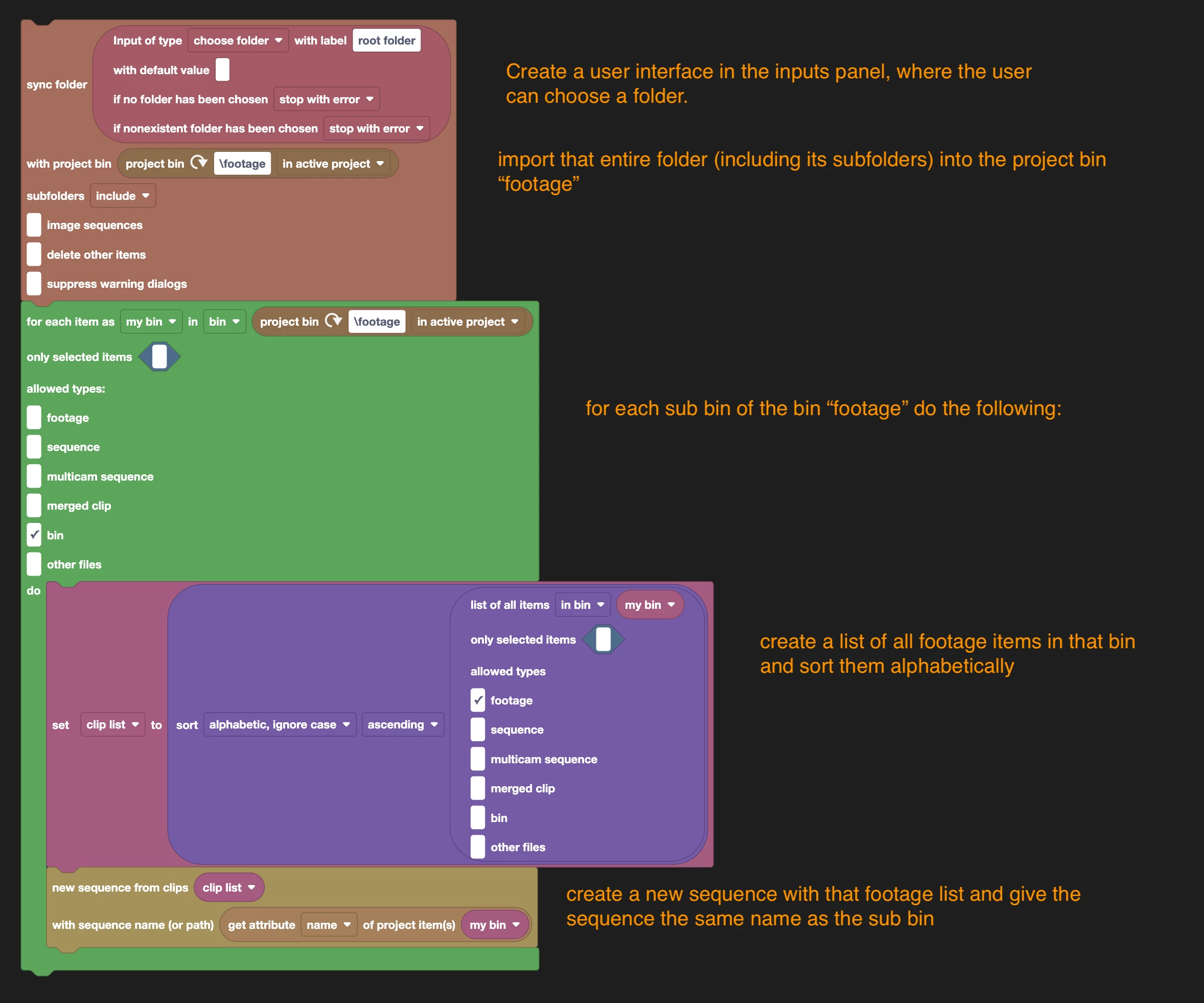
I think this Automation Blocks script is doing what you want:

Block script XML is attached such that you can load it into your Automation Blocks user library.
Then just restart Automation Blocks and you find the script in your Automation Blocks library.


To use the script:

1) once the script is loaded, the inputs panel of Automation Blocks contains a folder input where you need to pick the root folder.
2) run the script


2 replies

Mathias Moehl
Community Expert
Community Expert
June 22, 2025

If you don't want to create a full CEP panel, you can execute ExtendScript with my (paid) extension Automation Blocks.
Just create a new block script with a single "execute code" block to execute your jsx as described here:

https://docs.mamoworld.com/automation-blocks/block-reference/aeOther#executing-jsx-files


Mathias Möhl - Developer of tools like BeatEdit and Automation Blocks for Premiere Pro and After Effects
bbb_999
Community Manager
Community Manager
June 22, 2025

Premiere Pro has never had such a menu item; I think you're thinking of After Effects. 

The recommended approach to executing ExtendScript within PPro, is from within a CEP panel; see the PProPanel sample for all relevant details. 

Did you write that batch XML import ExtendScript? If not...did the creator provide any guidance, on how they expected it to be executed?


Participant
June 22, 2025

Oh alright. 


Yeah i read about CEP and then the new UXP Extension stuff. Basically I have a folder with subfolders. In each subfolders there is a sequence of videos which needs to get on a timeline. 


What I wanted is a script that just builds me a timeline for each subfolder and autoloads this in Premiere. But I think its just too much effort than importing it. 


Tried it then with mp4 -> .xml but you run into same issues since its not possible to script that easily. Like a .sh script that can be executed. 


#EXAMPLE 1:

ROOT FOLDER <- chosen folder

SUB_FOLDER - timeline1

   01_.mp4

   01_.xml

   02_.mp4

SUB_FOLDER - timeline2

   01_.mp4


# EXAMPLE 2:

ROOT_FOLDER <- chosen folder

01_video_desc.mp4

01_video_desc.xml

02_video_desc.mp4


bbb_999
Community Manager
Community Manager
June 22, 2025

What application is creating the .xml files, in those subfolders? If they reference the media that's also in the subfolder, you will want to import only the .xml file; otherwise, you'll generate duplicate projectItems for each .mp4 file, in your PPro project.

>Tried it then with mp4 -> .xml but you run into same issues since its not possible to script that easily.

I'm missing it; what, specifically, is not possible to script easily?