



rachelcenter
Legend
June 26, 2023
Answered

How come premiere wont preserve folder names upon import?

  • June 26, 2023
  • 6 replies
  • 415 views

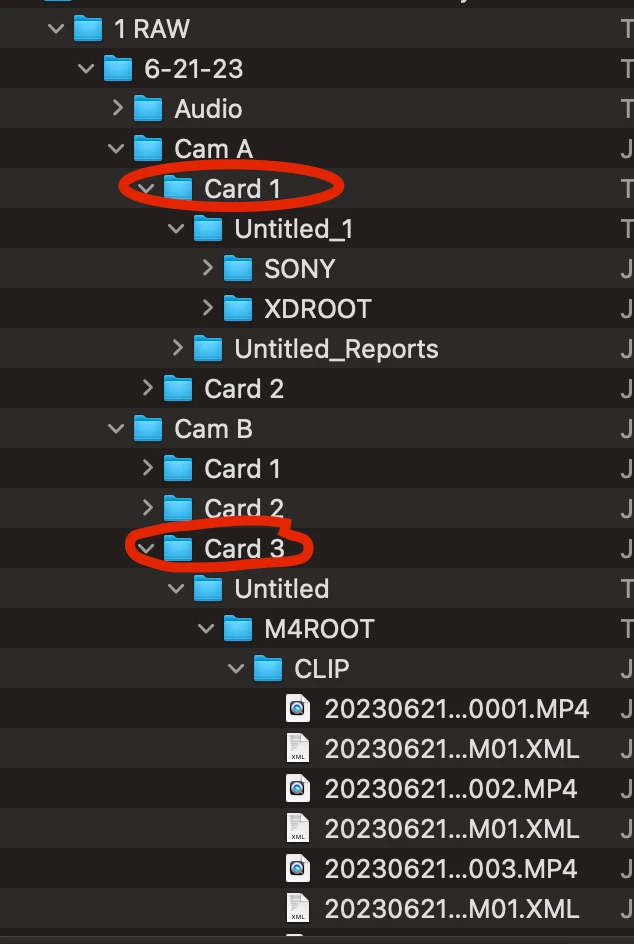
How come premiere wont preserve folder names upon import?  If I drag in the folder called "card 4" into premiere, it creates a folder/bin WITHIN PREMIERE called M4ROOT. Yes I know M4Root is a folder within Card 4, but how do I get premiere to import this "card 4" folder and still have the name show up as "card 4" when it imports.  In other words, I have 5 folders here with the names Card 1, Card 2, Card 3, Card 4, Card 5. It would be great to drag them all into premiere at once and when its done importing, each folder has their respective card names as opposed to 5 folders in premiere that are now called M4ROOT. Yes I've tried this experiment with Media Browser and it doesnt rectify the issue. Running version 23.5.0 (build 56). Apple computer.

This topic has been closed for replies.
Correct answer R Neil Haugen

You can install the public beta from the CC app. And as the public beta and the current shipping (23.5) are the same "full" version of 23, you can just open a 23.x project in the publie beta, then close, and open in the 23.5 just fine.


Premiere has never added folder names on import for folders with zero or only one item in them. That has supposedly ... FINALLY ... been changed in the public beta, where it will add the folder names regardless of whether there's anything in them.


This might fix your issue.


Neil

6 replies

Stan Jones
Community Expert
Community Expert
June 26, 2023

Here's the thread in the Beta forum for feedback.

https://community.adobe.com/t5/premiere-pro-beta-discussions/now-in-beta-mirror-os-directory-structure-on-import/td-p/13848837


I got confused and thought it was already in the release!


Stan


Community Expert
June 26, 2023

Thanks Neil, just tested the Beta and it's working as intended.
If I remember right, that was the same behavior a few versions ago, glad it's back again.

rachelcenter
Legend
June 26, 2023

I went to Beta and dragged in a folder called "card 1" and it kept the name of the folder this time

rachelcenter
Legend
June 26, 2023

These are not empty folders nor do they contain a single file.

R Neil Haugen
R Neil HaugenCorrect answer
Legend
June 26, 2023

You can install the public beta from the CC app. And as the public beta and the current shipping (23.5) are the same "full" version of 23, you can just open a 23.x project in the publie beta, then close, and open in the 23.5 just fine.


Premiere has never added folder names on import for folders with zero or only one item in them. That has supposedly ... FINALLY ... been changed in the public beta, where it will add the folder names regardless of whether there's anything in them.


This might fix your issue.


Neil

Everyone's mileage always varies ...
Community Expert
June 26, 2023

For some reason (?), Adobe changed the way Premiere Pro imports folders: now it will ignore empty folders. Also, if a folder contains a single file, the file will be imported without creating a folder.

I hate the new way of importing folders, and I saw many users complaining about it, but that's what we have for now.