Participating Frequently
May 30, 2020
Answered

How do I control how much of my image is revealed as it scrolls down?
  • May 30, 2020
  • 1 reply
  • 758 views


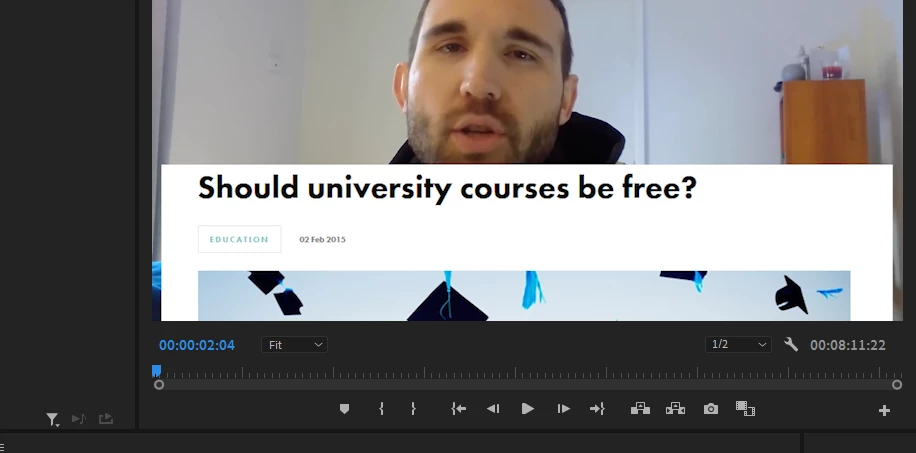
I have the image laid on top of me talking, and I want to scroll down the image over a number of seconds. But how can I make so as the image scrolls down, that it doesn't move past the top point now? (Where the border currently ends)

I can of course move the image up to 'scroll down', but that moves the image over me talking. I want to control how much is revealed as I move the image.


I can use a mask on the image of course, but that moves with the image. I need to be able to reveal more of the article, but only in the area shown in the picture I've provided. When I create a separate mask on top of both video layers, that doesn't work.


Thanks in advance for your help!

This topic has been closed for replies.
Correct answer Richard M Knight

Try nesting your moving image and then applying the mask (or linear wipe) to the nest. With a linear wipe you can add a feather to the edge so it is not a hard line.

1 reply

Richard M KnightCommunity ExpertCorrect answer
Community Expert
May 30, 2020

Try nesting your moving image and then applying the mask (or linear wipe) to the nest. With a linear wipe you can add a feather to the edge so it is not a hard line.

petartgAuthor
Participating Frequently
May 31, 2020

Thank you very much for your response, that worked.

Community Expert
May 31, 2020

Track matte would also be a way to do it. Left you a comment on reddit this morning about it.