Participant
June 11, 2023
Question

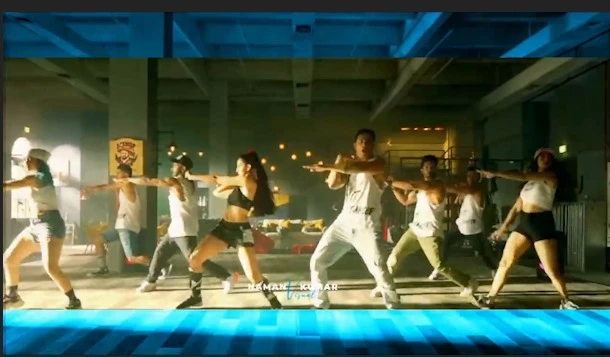
How do I create a "Widescreen Border Effect?"
  • June 11, 2023
  • 2 replies
  • 352 views


how to make this effect and also what is the name of this effect please answer me.


Mod note: Title was changed.

This topic has been closed for replies.

2 replies

Kevin-Monahan
Community Manager
Community Manager
June 12, 2023

Hi @Priyanshu3042680849nv,

I saw your request for help with this effect for colored bars to be visible and semi-opaque at the top and bottom of the screen. There is no offical name for this effect that I know of; pehaps call it a "Widescreen Border Effect." Regardless of its name,

try this recipe.


  1. Click on the Project panel.
  2. Choose File > New Color Matte.
  3. Create the matte's color and dimensions. Click OK.
  4. Edit the matte to V2 and trim it to the length of the clip on V1.
  5. Select the matte in the Timeline.
  6. Create a rectangular mask in the Opacity parameter.
  7. Click the Inverted button in the matte parameter.
  8. Adjust the matte points accordingly.
  9. In the Opacity Parameter, choose Blending Modes > Screen.


That creates an effect similar to the one you posted. Let us know if it works.


Thanks,
Kevin


Kevin Monahan - Sr. Community & Engagement Strategist – Pro Video and Audio
Participant
June 11, 2023

Please answer me it's very urgent