

Participant
April 30, 2025
Answered

how do i fix this audio tracks?

  • April 30, 2025
  • 1 reply
  • 277 views


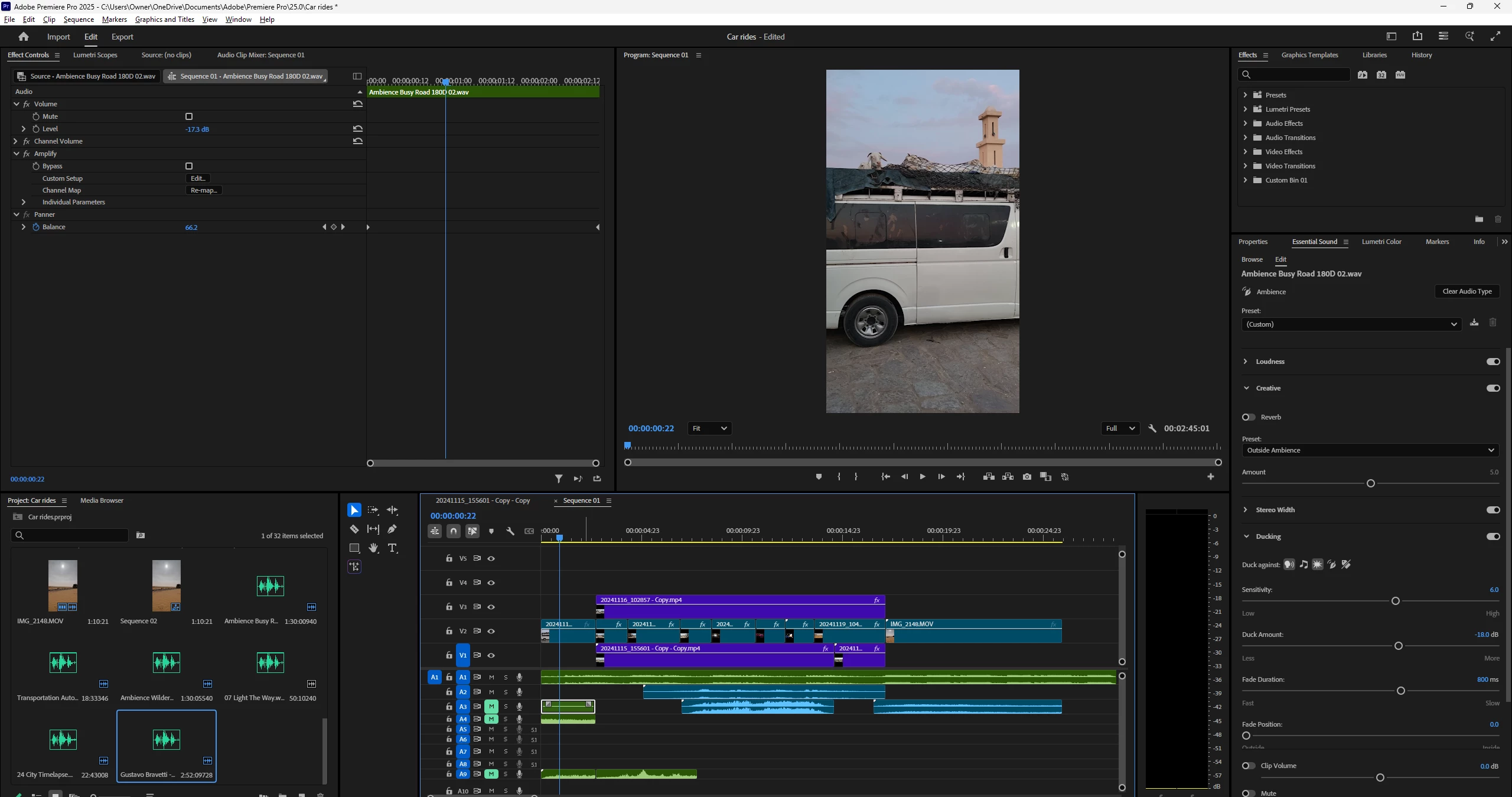
i cannot figure out what to even ask to fix this. but the 5.1 wont let me edit or post any clips there all the other channels i create go below all of it and its really annoying. anyone can help?

Correct answer PaulMurphy

To adjust the audio channel format of your clips in Adobe Premiere Pro, follow these steps:

  1. Select your clips in the Project panel: Highlight the clips you want to modify.
  2. Go to Clip > Modify > Audio Channels: This opens the Modify Clip dialog box.
  3. Change the Clip Channel Format: Set it to Mono and click OK.

Important: These changes only apply to clips in the Project panel. Any clips already placed on the timeline will retain their original audio channel settings. To update those, you’ll need to replace them with the modified versions from the Project panel.

1 reply

Community Expert
April 30, 2025

You can only add clips with a 5.1 channel format to 5.1 tracks. It looks like your clips are all mono or stereo.

Participant
May 4, 2025

How do I get them all to mono? 

PaulMurphyCommunity ExpertCorrect answer
Community Expert
May 5, 2025

To adjust the audio channel format of your clips in Adobe Premiere Pro, follow these steps:

  1. Select your clips in the Project panel: Highlight the clips you want to modify.
  2. Go to Clip > Modify > Audio Channels: This opens the Modify Clip dialog box.
  3. Change the Clip Channel Format: Set it to Mono and click OK.

Important: These changes only apply to clips in the Project panel. Any clips already placed on the timeline will retain their original audio channel settings. To update those, you’ll need to replace them with the modified versions from the Project panel.