Inspiring
March 16, 2021
Question

How do I get more control to target bitrate setting?

  • March 16, 2021
  • 2 replies
  • 1006 views

As currently I am recieving jobs from some broadcast companys as my clients, many of them will have certain requirment in bitrate.


Like for a lastest job that I recieved,

Video Codec: Mpeg2

Wrapper: MXF-OP1A

Bitrate: 50Mbps

Audio Bitrates: 384kbps
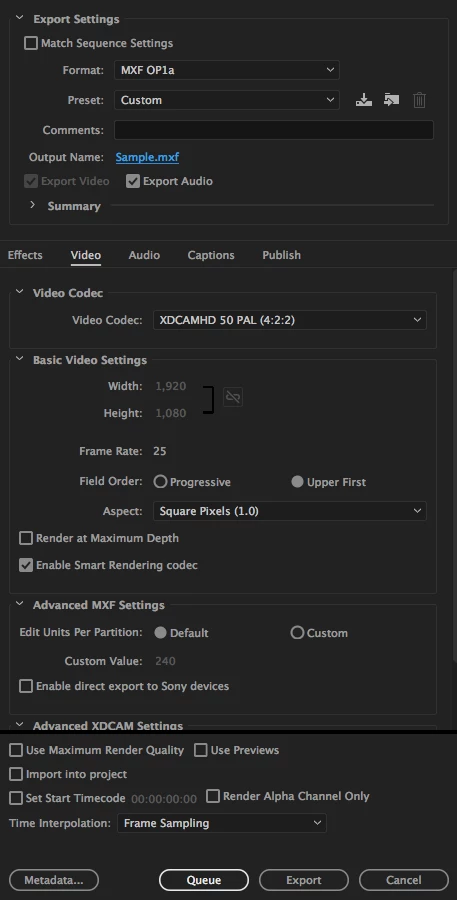
 

Yet I guess I didn't have the control for any of these on the panel (I know for H.264 mp4. you can set a target bitrate)

May I ask if there are any way to do or any 3rd-party plugin I can look into?
Thank you very much!

This topic has been closed for replies.

2 replies

Community Expert
March 16, 2021

Export Settings:

Format: MXF OP1a

Preset: Custom

Video Codec: XDCAM HD 50 (4:2:2) - this is MPEG 2 at 50Mbps

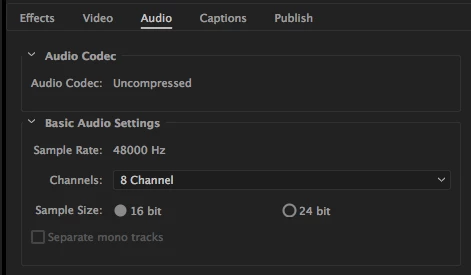
When working with MXF OP1a Audio is uncompressed, you can choose 16 or 24 bit at 48000 Hz

and i found this:

24 bit, 48KHz 2,304 Kbps 288 KB


i think these settings are good to go for your required broadcast settings


kaihin30Author
Inspiring
March 18, 2021

I've tried 16bit sampling but the audio bitrate is still 768kbps.

Community Expert
March 21, 2021

how about 24 bit?

kaihin30Author
Inspiring
March 16, 2021

I just figure out the the bitrate is already 50Mbps after export but I'll still need the audio bitrate to be limited under 384kbps.

Thank you very much!