Unique_username
Participant
May 27, 2026
Question

How do I give Premiere 2026 access to my public folders?

  • May 27, 2026
  • 3 replies
  • 19 views

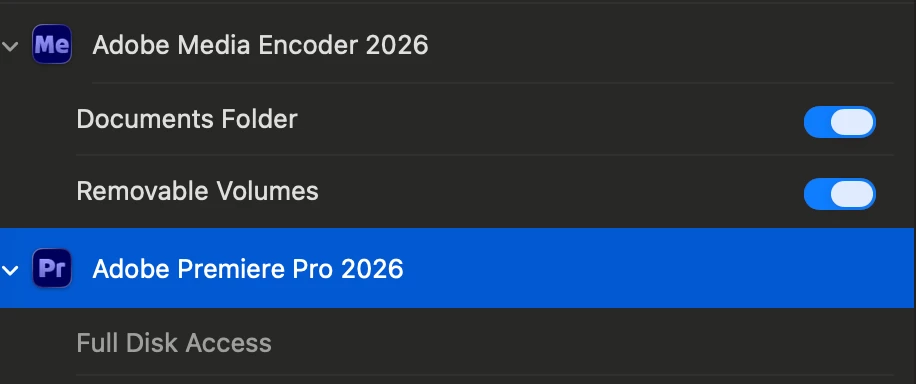
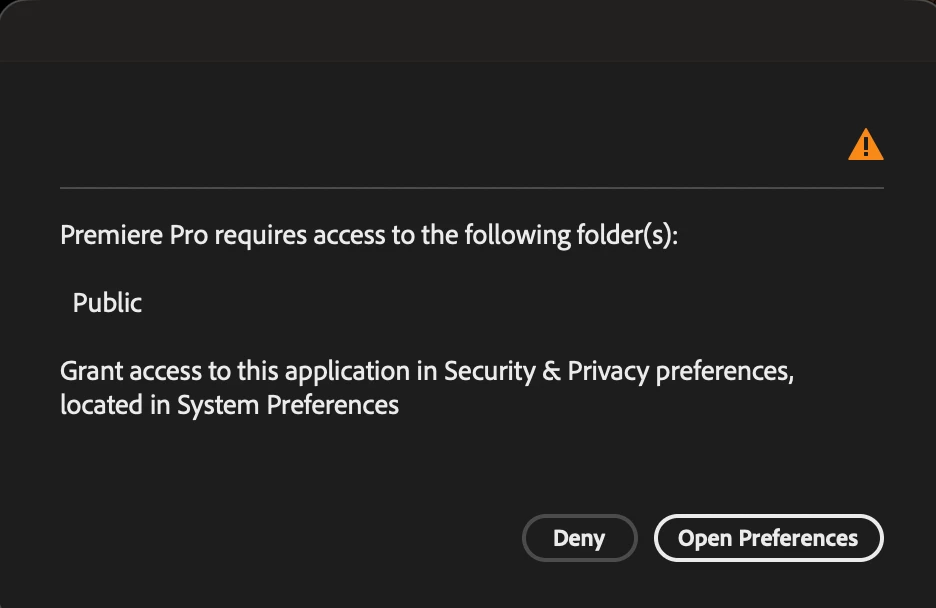
I'm not able to access to Premiere 2026 because it doesn't have access to public folder, but when I head to Files & Folder it doesn't allow me to grant Premiere access to public folders.


I’ve attached two images of what I’m being shown for reference.
 

    3 replies

    R Neil Haugen
    Legend
    May 27, 2026

    IF you are running with Admin privileges, then you can adjust this.  Typically the first thing is to right-click the application’s .exe file, and under the options Windows gives, select ‘run as Administrator’ ... which fixes this for some people.


    For others, they have to unselect that option ... I totally do not understand but that is the case.


    Past that you can go to the Explorer (Windows file manager applet) and right-click the top folder and go through the process to change permissions for that folder tree. 

    Everyone's mileage always varies ...
    Stan Jones
    Community Expert
    Community Expert
    May 27, 2026

    @Unique_username,


    Are you logged into an account that has administrative rights? Did you run previous version of PR on this machine, or is this your first version?


    Stan


    Unique_username
    Participant
    May 27, 2026

    I am. I ran previous versions of Premiere in my computer yes, the 2023 version to be more specific.

    Community Expert
    May 27, 2026

    Are you working with a company that has protections? You may need to contact your IT Dept.

    Unique_username
    Participant
    May 27, 2026

    I’m not working with any company.