
Inspiring
September 30, 2025
Answered

How do I go to a specific timecode using the keyboard?

  • September 30, 2025
  • 2 replies
  • 439 views

I'm trying to find a way to navigate to a specific timecode in my timeline using only the keyboard.


I'm aware that I can type in digits using the numpad and they will automatically be typed in the "Playhead Position" field in the timeline, but when I do this I can't also enter colons or semicolons, so I can't enter a valid timecode.


What am I missing?
Correct answer Averdahl

That did it! Thank you. Do you know if this is documented somewhere? Shouldn't be this hard to discover.


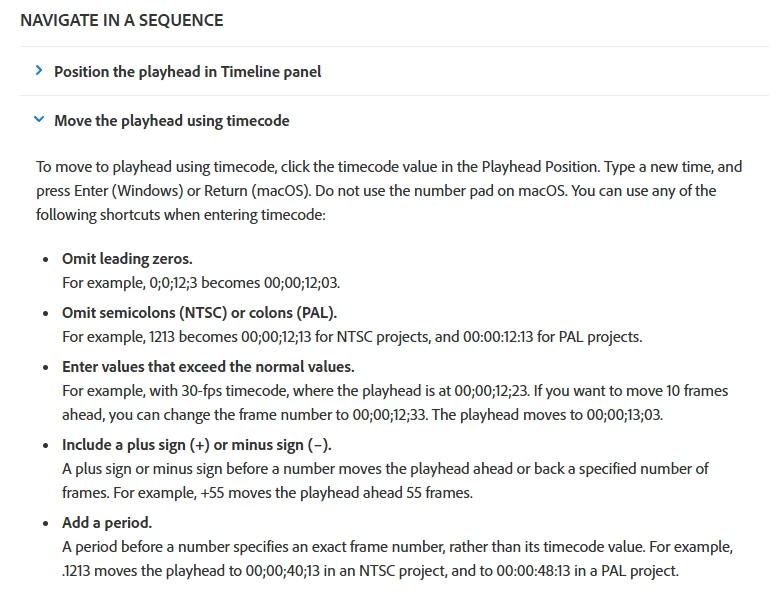
I almost gave up but found it here after a while: Welcome to the Premiere Pro User Guide


Then, go to Editing > Sequences > Create and change sequences and then scroll down a bit to NAVIGATE IN A SEQUENCE and click on Move the playhead using timecode. (See the attached image below)

Using + and - when working with timecode and keyboard is really good. 🙂


I also found this video from Larry Jordan that describe it good: How to Use Timecode to Navigate Timeline or Media in Adobe Premiere Pro - YouTube


That did it! Thank you. Do you know if this is documented somewhere? Shouldn't be this hard to discover.


By @jackbrannen_pl

2 replies

Inspiring
September 30, 2025

You don't need to enter the colons, it will automatically recognize them.

So for example for 07:14:23:17, you just need to type 07142317 and it will take you to that specific time.

If, for example, you enter a timecode without the hours and minutes, it will consider them as 00:00... so if you enter 2317, it will take you to 00:00:23:17

Makes sense?

Inspiring
October 1, 2025

@Sami Succar What to I to do enter my selection? Pressing return just moves to the beginning of the timeline and starts playback.


So to clarify, what's happening is I enter my digits via numpad—either an 8-digit string or something shorter, as you suggested. But then, no matter what I type, I have to hit some button to confirm my entry. But hitting enter moves the playhead to 00:00:00:00 and starts playing from there.

Averdahl
Community Expert
Community Expert
October 1, 2025

Hit Enter on the numeric keypad.

quote

...But hitting enter moves the playhead to 00:00:00:00 and starts playing from there.


By @jackbrannen_pl


Stan Jones
Community Expert
Community Expert
September 30, 2025

@jackbrannen_pl,


Click on the timecode: all will be selected. Do not deselect it and type the numbers only. The colon/semicolons will be added.


I don't recall a way to get to that box without the mouse. Anyone?


Stan


Stan Jones
Community Expert
Community Expert
September 30, 2025

Ah: just start typing in the KEYPAD - it goes to the timecode box.


Stan