Participant
November 24, 2013
Answered

How do I insert a clip in front of an already edited sequence on the timeline?

  • November 24, 2013
  • 5 replies
  • 26059 views

I have a 5 minute sequence already edited on the timeline. I need to insert a 15 second "logo stinger" clip in front of the 5 minutes.

I basically need to add 15 seconds in front of my already edited 5 minute clip....... How do I do this?
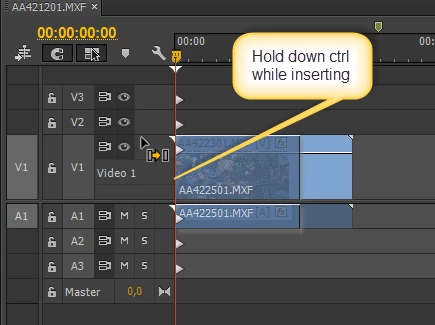
    Correct answer Ann Bens

    A picture says more than a thousand words;

    file

    Get Started with Premiere Pro
    New to Premiere Pro? Get started with your first project — editing a video. In less than an hour, you'll learn to edit together different types of media to tell a video story.

    5 replies

    Participant
    May 3, 2020

    Ann, I actually found this extremely efficient guidance. Exactly what I needed. Thank you.

    Inspiring
    November 24, 2013

    I've needed to add a "countdown" leader to a film with multiple audio and video tracks, and I've worried that all of them will nicely shift and keep sync with an insert edit.  My process?  I hit Command-A to "select all", and basically drag everything a bit to the right in the sequence to make room for the leader (or in your case, the logo).  I'd add the logo, dragging and dropping it into place, and then (assuming everything else is still selected) I'd drag it all back to the left until it "snaps" into place.  If for some reason the rest of the sequence is no longer selected, I'd simply "lasso' it and then drag.

    This always works for me and never results in something getting knocked out of sync.  Keep the questions coming.  What is is this forum for?  Ignore the haters.  Cheers!

    jesicaj198
    Participant
    December 3, 2017

    Thanks, Greg. Best response I've found!

    The others don't make a ton of sense to us newbies...and I certainly don't have a manual since this software came with my online subscription. I've been googling away and this forum is the thing I found in answer to my question...so googling doesn't always get you everything you are exactly looking for, but your answer did for me!

    Inspiring
    December 3, 2017

    If you’re interested, I can email you the downloadable version of the PP user’s manual Adobe used to make available.  It covers about 95% of the current software.  Let me know.

    Greg Popp

    [personal info deleted by mod]

    Ann Bens
    Community Expert
    Ann BensCommunity ExpertCorrect answer
    Community Expert
    November 24, 2013

    A picture says more than a thousand words;

    file

    Get Started with Premiere Pro
    New to Premiere Pro? Get started with your first project — editing a video. In less than an hour, you'll learn to edit together different types of media to tell a video story.

    Participating Frequently
    November 24, 2013

    Thank you, Ann.  That is two put-downs in one short thread.  Just the reason why I hardly ever post these days!

    Participating Frequently
    November 24, 2013

    Far from being plut downs, it is just being helpfull.

    There is nothing worst than someone who cannt be bothered to rtfm.

    In the time taken to post and wait for a reply, a user could search the web, or read the manual

    Another way to solve this problem is to create a new sequence, insert the start video and then nest  the original sequence next to the start vid, OK now someone is going to post...what is a nest sequence.....my answer rtfm.

    Col

    Participating Frequently
    November 24, 2013

    In addition to the incredibly basic answer provided by syager, you need to hold down control while you drag.  If you do not, your "logo stinger" will over-write the start of your editied sequence. From your question, I assume that you do not want to over-write.

    I have assumed that you are on a PC.

    Participant
    July 30, 2023

    Thank you so much! This made all of the difference!


    Inspiring
    November 24, 2013

    This is incredibly basic. You really should take a basics tutorial online. Set the in and out points of your clip and then drag it from the bin to the timeline.     

    tolacAuthor
    Participant
    November 24, 2013

    Wow...your answer was incredibly arrogant. You should take a basics good manners tutorial.

    Inspiring
    November 24, 2013