

SocialValley
Known Participant
August 7, 2020
Answered

How do I know a specific location of a nested and cut video in the primary timeline

  • August 7, 2020
  • 2 replies
  • 632 views

Scenario: 

I have a couple of cutted videos, they are all nested..

I have an instruction from my manager to cut a specific part (For example: from 5:22 minutes to 6:22)

I added a lot of extra media such as intro video and other stuff, so 5:22 isn't the same for me anymore.. 

I have to go into the nested video and check what is the original 5:22 - 6:22 part


The question:

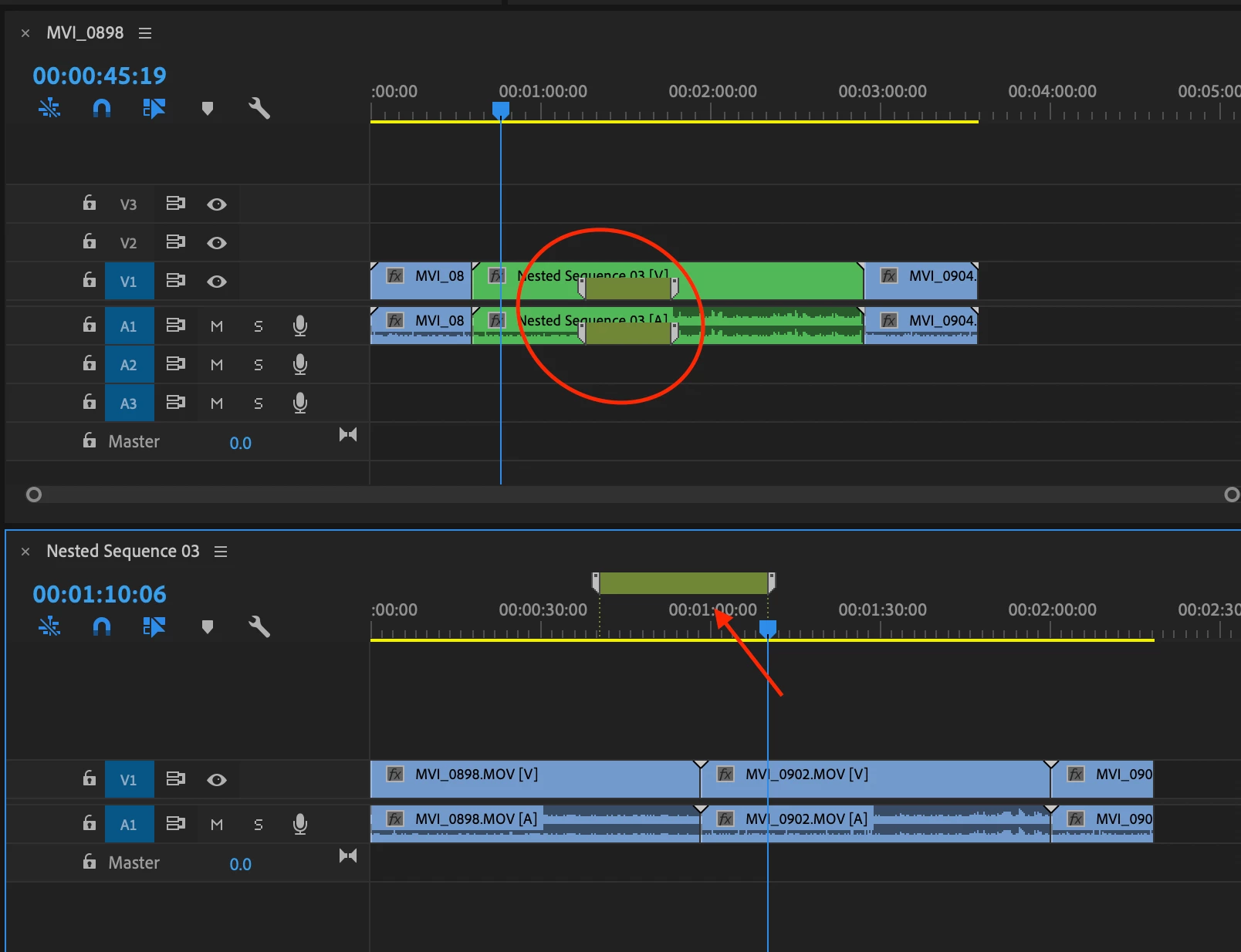
How can I go to that nested video and mark 5:22 - 6:22 part and see where it is exactly on the whole timeline project?
This topic has been closed for replies.
Correct answer Mike Dziennik

If you add a 'sequence marker' with a duration (double click on it an adjust the duration control) on your nested timeline, it wil appear as a 'clip marker' on the parent timeline. Make sure you have "Show Clip Markers" enabled in the wrench menu.

2 replies

Mike Dziennik
Community Expert
Mike DziennikCommunity ExpertCorrect answer
Community Expert
August 7, 2020

If you add a 'sequence marker' with a duration (double click on it an adjust the duration control) on your nested timeline, it wil appear as a 'clip marker' on the parent timeline. Make sure you have "Show Clip Markers" enabled in the wrench menu.

SocialValley
Known Participant
August 8, 2020

Thanks, that did it for me!

R Neil Haugen
Legend
August 7, 2020

Do you mean 5:22 of the nested sequence, or 5:22 of the current sequence with the various nests added?


Neil

Everyone's mileage always varies ...