Inspiring
December 3, 2021
Answered

How do I locate my sequences in Adobe Premiere?

  • December 3, 2021
  • 1 reply
  • 1164 views

Okay, I've created a bin and it now contains odds and ends of images from which I want to create various short animated sequences for future use.  I arranged the odds and ends to create the first such sequence and I exported it as a sequence.  So far, so good.


My problem is, I do not know where the sequence is now.  I assumed that it would show up in the bin along with the odds and ends, but it does not.  Where do the sequences go that I create from a bin in Adobe Premiere?


This topic has been closed for replies.
Correct answer Sumeet_Kumar_Choubey

Hi there,


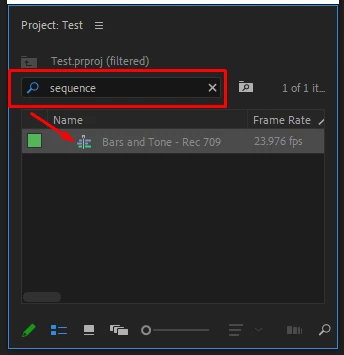
Have you tried searching for "sequence" in the search box of the Project panel? This can help by listing all the sequences made in that project.


Thanks,

Sumeet

1 reply

Sumeet_Kumar_ChoubeyCorrect answer
Adobe Employee
December 3, 2021

Hi there,


Have you tried searching for "sequence" in the search box of the Project panel? This can help by listing all the sequences made in that project.


Thanks,

Sumeet

777bbbbqAuthor
Inspiring
December 3, 2021

Thanks, that worked!