Participant
June 16, 2020
Answered

How do I make the media name show on my sequence?

  • June 16, 2020
  • 3 replies
  • 455 views

I tried closing the program a couple times, thought it was a bug. But now all media in my sequences no longer show their names, which is a big deal for someone with OCD.


Please help :] and thank you in advance.

 

This topic has been closed for replies.
Correct answer Meg The Dog

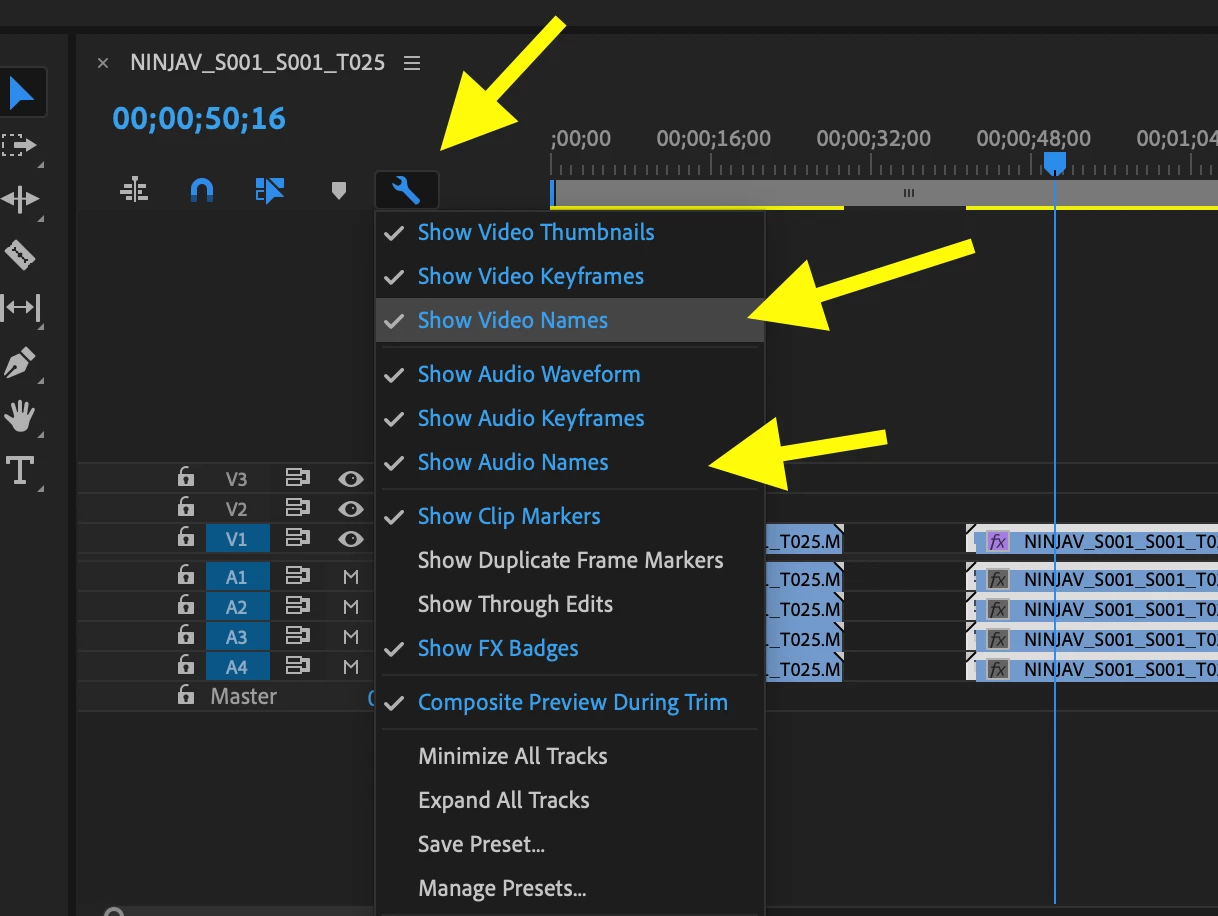
Click on the wrench icon in the upper right of the timeline and in the drop down menu that opens,  make sure Show Video Names and Show Audio Names are toggled on (checked):

MtD

3 replies

Participant
June 16, 2020

Thank you so much!! ^_^ It worked! I can feel my sanity raveling up again! Thank you

Meg The DogCorrect answer
Inspiring
June 16, 2020

Click on the wrench icon in the upper right of the timeline and in the drop down menu that opens,  make sure Show Video Names and Show Audio Names are toggled on (checked):

MtD

Legend
June 16, 2020

I believe it's in the wrench menu of your sequence panel... if not there it's under the hamburger menu of your sequence panel, but I'm pretty sure it's the former.


It's called "Show Video Labels" or "Show Video Clip Names" something like that, and I'm too lazy right now to check for the exact terminology.