

Inspiring
August 3, 2026
Answered

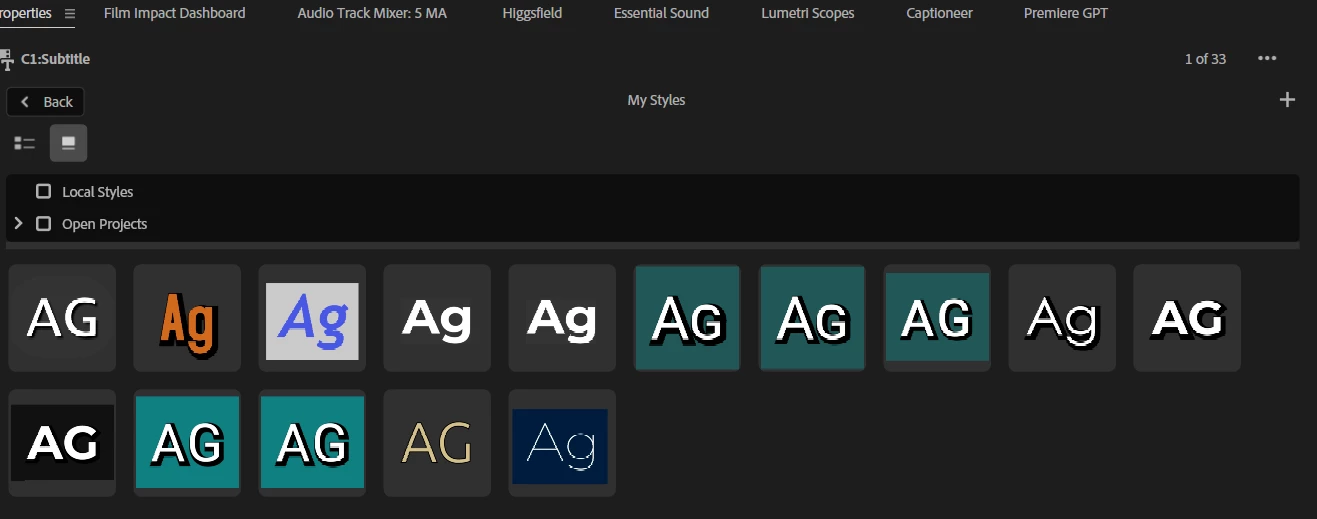
How do I remove text styles? Google doesn't know, and Gemini doesn't know either. Help!
  • August 3, 2026
  • 6 replies
  • 45 views

How do I delete unnecessary styles? It's kind of a tricky puzzle. Could you add a “Delete” button?

    Correct answer Stan Jones

    In the Style browser, click on Local OR Open Projects, but not both. Local styles are the ones in the folder path Ann listed. The ones in Open Projects are in the Project panel for the project they are in.


    Stan


    6 replies

    Stan Jones
    Community Expert
    Stan JonesCommunity ExpertCorrect answer
    Community Expert
    August 4, 2026

    In the Style browser, click on Local OR Open Projects, but not both. Local styles are the ones in the folder path Ann listed. The ones in Open Projects are in the Project panel for the project they are in.


    Stan


    Ann Bens
    Community Expert
    Community Expert
    August 3, 2026

    Show screenshot content text styles in documents.

    Stan Jones
    Community Expert
    Community Expert
    August 3, 2026

    @Paul_Gringo,


    Upvote this feature request and see my comment there.


    If the styles are saved in the project, you can delete them in the Project Panel. If you save them as “local” styles, Ann’s path does the trick.


    Stan


    Inspiring
    August 3, 2026

    The search can't find them. Which folder are they in? And if I created them in another project, they won't be in the new one. Is there another option?

    Ann Bens
    Community Expert
    Community Expert
    August 3, 2026

    Try: Documents > Adobe > Common > Assets

    Inspiring
    August 3, 2026

    Not all the styles I want to delete are there.
