
dd123 estatic
Participant
December 9, 2018
Answered

How do I render in and out part of a sequence on Premiere Pro 2019

  • December 9, 2018
  • 3 replies
  • 4167 views

This used to be on 2018 and older. It was very useful cause everything would be instantly completely unusable but 2019 changed things and now the only option i have is to render everything when i only want to pre-render a single damn part of a clip.
This topic has been closed for replies.
Correct answer Meg The Dog

no. I used to in 2018 version but not the 2019


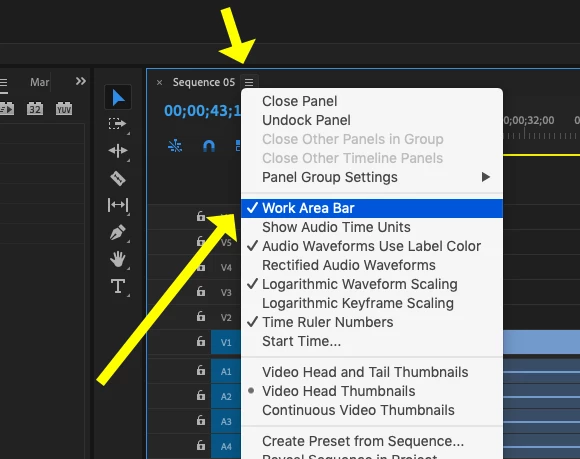
The Render In to Out changes to Render Effects in Work Area if the Work Area Bar is toggled on (checked) in the drop down menu in the timeline. To return to Render In to Out, uncheck (toggle off) the Work Area Bar:

MtD

3 replies

Averdahl
Community Expert
Community Expert
December 9, 2018

This used to be on 2018 and older. It was very useful cause everything would be instantly completely unusable but 2019 changed things and now the only option i have is to render everything when i only want to pre-render a single damn part of a clip.

  1. Use the I-key to set an In Point to set the start point.
  2. Then, use the O-key to set an Out Point to set the end point.
  3. To render from the In Point to the Out Point, press Enter on the keyboard or go to Sequence > Render Effects In to Out.

IMHO, this is much more efficient than to use the old relic Work Area Bar.

Ann Bens
Community Expert
Community Expert
December 9, 2018

I select clips, hit forward slash then a shortcut for Render in to Out.

mru62
Known Participant
December 9, 2018

Verstehe ich nicht. Bei 2019 geht: Ich markiere eine Sequenz in der Timeline und diese wird über Sequenz in/out dann gerendert. Ich kann in den Exporteinstellungen "benutzerdefiniert" einsdstellen und dann die Sequenz direkt abstecken. Oder eben auch vollständige Sequenz alles rendern. Also bei mir funktioniert alles. Gerade getestet, funktioniert alles.

dd123 estatic
Participant
December 9, 2018

But how? The button to render in and out under sequince is gone and replaced with work area(whatever thats supposed to mean)

Community Expert
December 9, 2018

Do you see Sequence > Render In to Out from the dropdown menu?

Community Expert
December 9, 2018

I have Premiere 2018 on my current computer so can't check the difference you're saying. However, I would have thought the process would be the same.

Are you setting In and Out points on your sequence? It should be as in the page below:

Adobe Premiere Pro Help | Rendering and previewing sequences

dd123 estatic
Participant
December 9, 2018

Yes im doing that. the sequince options for preview rendering are completly different on 2019