edit58989569
Inspiring
July 14, 2023
Question

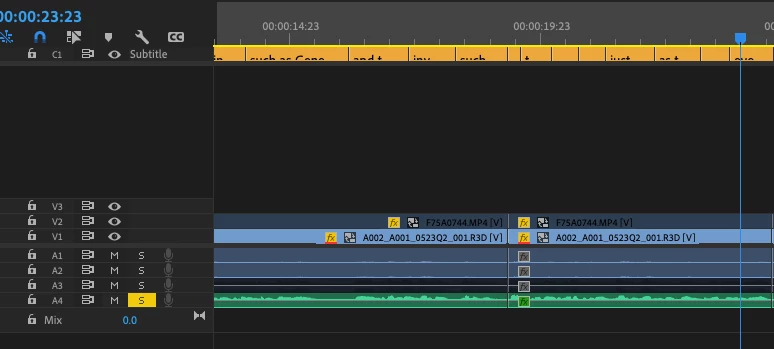
How do I see the captions track?

  • July 14, 2023
  • 2 replies
  • 262 views

23.5 


I tried resetting the workspace, reopening the sequence and restarting. 
 

This topic has been closed for replies.

2 replies

Stan Jones
Community Expert
Community Expert
July 21, 2023

@edit58989569,


At first I thought you meant that you could not see the captions in the Program Monitor. But I see that your caption track is not showing the full captions in the segments. I think you have increased the height of the track, but it is not displaying. Click on the CC in the track header area. Pick "Show active track only."


See this post, where I describe assigning a keyboard shortcut for this purpose:

https://community.adobe.com/t5/premiere-pro-ideas/make-caption-track-height-adjustable/idc-p/13836853#M9226


I just tested in 23.5.0, and it is working. Then it was not working and then working again. If it is not working, try using the Shft+scroll to change all tracks, then repeat the "active track only" setting. And then reset workspace perhaps.


In that thread, I also have a long post on caption track height for one or more caption tracks.


@Kartika Rawat, does that information still look accurate? It is one of the areas where there is not enough info in the documentation.


Stan


Kartika Rawat
Community Manager
Community Manager
July 21, 2023

Hi there!

Thanks for writing in. Can you try Window > Reset to the saved layout? If this doesn't work try switching to the default workspace like All Panels, Editing, Effects, Color, etc.


Let us know how it goes. 

Kartika