Participant
March 10, 2020
Answered

How do i smoothly increase speed in Motion Postition?

  • March 10, 2020
  • 2 replies
  • 396 views

I have a clip with text on it.

I'm wanting the text to exit the page left to right but want to start slowish and gather pace. But don't want to add multiple keyframes as this ends up being jerky.  Want a nice smooth effect.

How do i get this effect? I'm thinking along the lines of a car doing a 0-100kmh it does not increase speed at a constant rate. If that makes any sense.


Any help or suggestions appreciated 🙂
This topic has been closed for replies.
Correct answer Meg The Dog

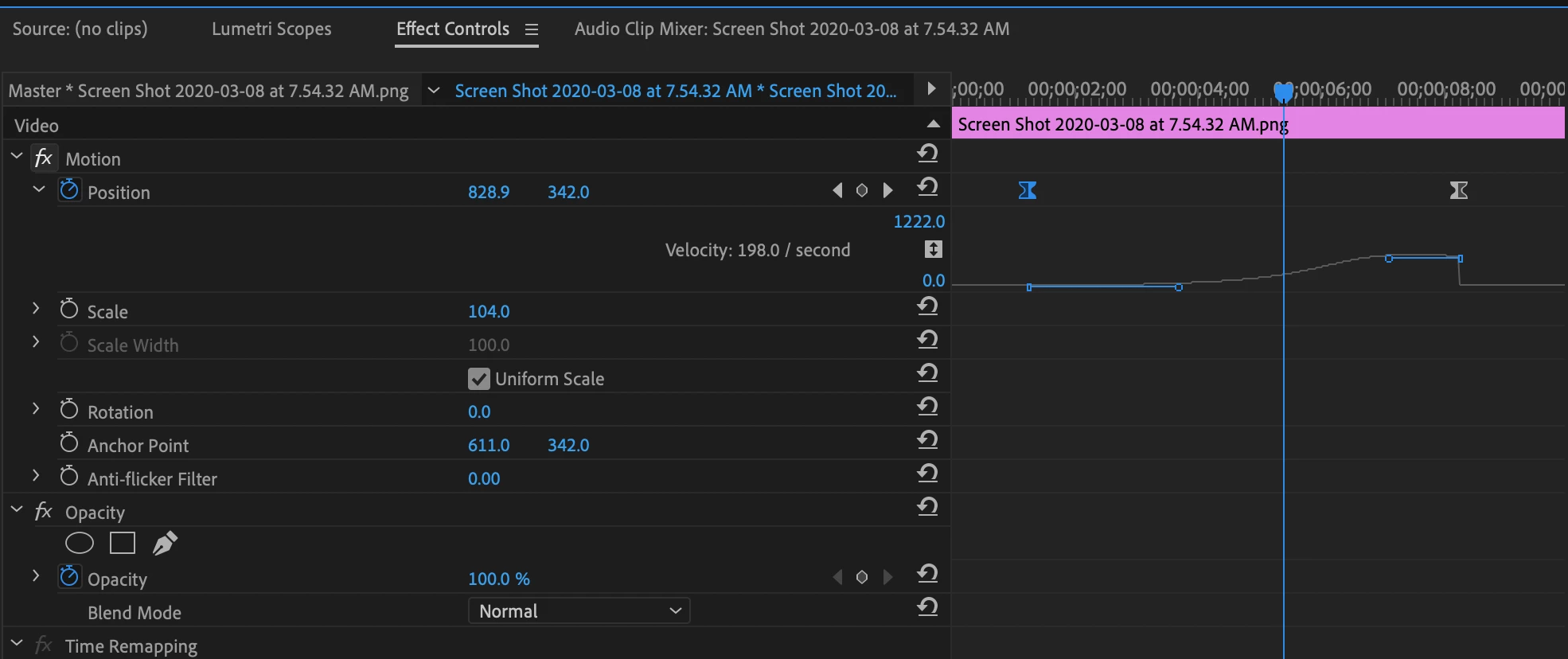
Change the keyframe interpolation to Bezier, then adjust the velocity curve to your liking:

MtD

2 replies

Meg The DogCorrect answer
Inspiring
March 10, 2020

Change the keyframe interpolation to Bezier, then adjust the velocity curve to your liking:

MtD

Participant
March 10, 2020

Hi @Meg_The_Dog

Thanks for the reply, i had been playing around with these. Started getting a little confused and didn't know if there was any other option. But actually think that the Ease In/Ease Out should sort the situation.

Thanks once again.

Legend
March 10, 2020

have you tried different keyframe interpolations?  control-click or right click on the keyframe and play around with the various options.