



How do you do problematic 10> camera multicams?
I'd like to discuss syncing problematic multicams in order to, maybe, learn some new approaches. This is what I call a problematic multicam:
a) 2 steady trypod cameras with an on-camera sound about 3-5 meters distance from the speakers that roll the scene without stopping.
b) 2 b-roll cameras on a trypod with an on-camera sound that shoot from time to time, when there are certain details that need to be captured.
c) 2 iPhones with VFR and an on-camera sound that are outside the set (they can barely capture the scene sound) which are to capture people's reactions but they should be stricktly bound to timings when those reactions should be shown. Because of the low sound they can't be synced to the main audio. And they do not shoot constantly - the cameramen also turn them on from time to time.
d) 1 video-call screen capture. It has only the sound of the people of this video-call, and due to the natural delay between the screencast and the sound captured by the on-set cameras (one "a" and one "b" - these also shoot the screen) they cannot be properly synced too.
e) 1 wide microphone that is placed on the table in the middle of the set that captures the sound of everything including the video call.
f) There's also a hyperdeck 4-track sound which has a clear audio of almost everything happening on the set.
There is no embeded timecode. We don't live in an ideal world.
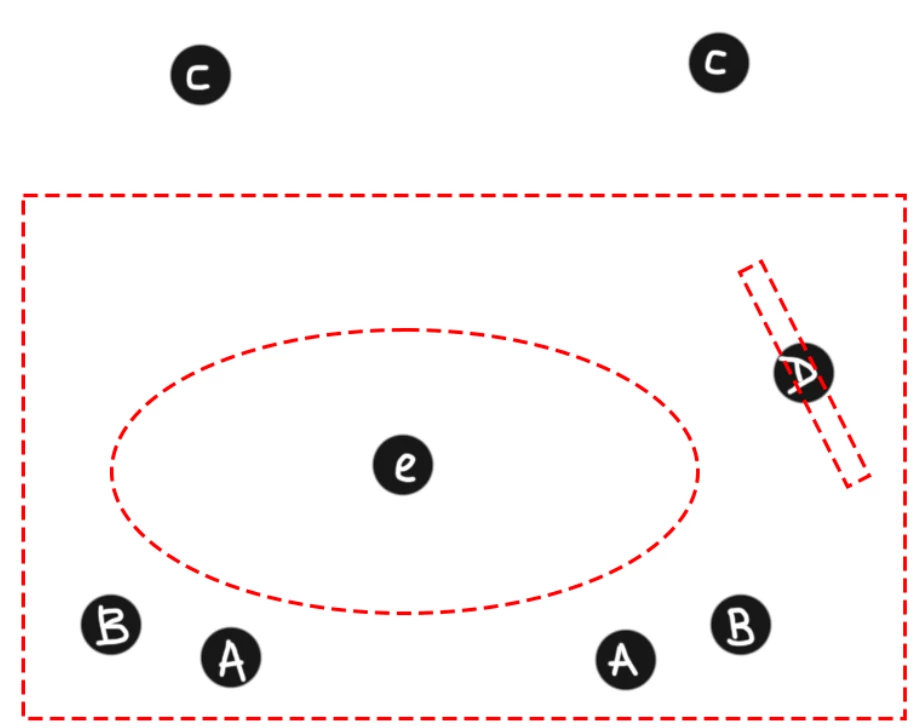
And all of this should be made into a multicam because there's a heavy sound design after the mudlticam cutting is done.
The main problems are:
1) Premiere Pro, Sincailia, Pluraleyes cannot sync everything. They can do only the 2 steady cameras from "a" that shoot constanlty + the mic on the table from "e" and the video-call from "d".
2) Once synced with the 2 cameras and the mic, the video-call video is out of sync. If you move the videotrack to be in sync with the video captured by the 2 cameras, the sound gets desynced and an echo is introduced. I moved both manually but there is still some echo because even with the sound units turned on I cannot place the audio exactly where it should be to stay in sync with the rest.
3) Some of the "b" cameras can be synced manually (with the Synchronize function), but most of them cannot because thay may happen when there's no one talking + they are too distant from the people and can barely capture their speech. I tried gaining the sound and in most cases it did not help, so I had to place these pieces manually and it took too much time. The other problem here is there are about a hundred of those b-rolls and the manual work would take ages.
4) The "c" iPhone cameras have a VFR so they could not sync at all even when the speech parts recorded were perfectly heard. What I did - I cut those clear parts, rendered and replaced them and synced the rendered parts, then unrendered (Premiere pro somehow cannot sync the in-out-point-parts, it always tries to analyse and sync the whole clip). This totally took time. I could also transcode to prores to eliminate the VFR but there's too much footage which means it'd have taken too much time and disk space.
5) The "f" hyperdeck sound is great but it has 4 tracks each of which matters at a certain point (for instance on one track the host sounds better and closer when he talks, on another - the video-call, the third one has a great guests' sound but it also captured the cameramen trying to talk quietly, and so on) but put together they bring a lot of the background noise, unnecessary third-party dialogues and a delay between the videocall captured by the on-set cameras and the screencapture.
So I would like to know how would you approach such a prblematic task in a really short deadline (one day for the 1,2 hours worth of final footage). How would you sync the cameras, how would you add those parts that could not be synced. How would you deal with the problem when the multicam is cut but you need to change its preferences after the cutting for a certain part of the whole recording. Plus there's always a problem of routing the tracks, when the created multicam has tracks sounding inside the multicam and there's no sound on the same tracks in the main sequence where the multicam lies.
What is the best approach for this kind of job? What would you personally do?
And the last thing: please, don't post links to generic youtube lessons on how to work with milticams, because I can make one myself, am 15 years in Premiere Pro. I want YOUR approach, not a blogger's.
Thanks
 AdChoices