October 21, 2019
Question

How save a lower third template?

  • October 21, 2019
  • 4 replies
  • 3161 views

Hey Guy i have a question.. i ve created a lower third like this tutrial on youtube

https://www.youtube.com/watch?v=qRXRWEPg9jg


My Question is: HOW CAN I SAFE THIS AS A TEMPLATE FOR OTHER PROJECTS


and HOW CAN I IMPORT IT ON OTHER PROJECTS


I want NOT to safe it as premiere data and open it via media browser i want this as a template in premiere pro.
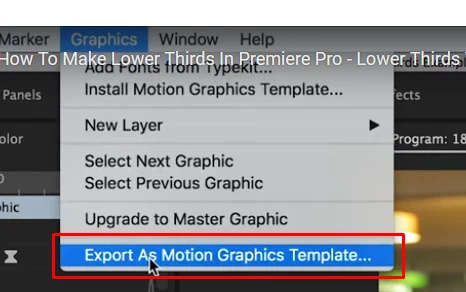
 

I saw a video  ( https://www.youtube.com/watch?time_continue=191&v=aUXo-HpV1Os ) but the "Export as motion graphics template.." menu fold is blocked for me (Why?)


hope u can help me thx

    This topic has been closed for replies.

    4 replies

    Ann Bens
    Community Expert
    Community Expert
    October 21, 2019
    Ann Bens
    Community Expert
    Community Expert
    October 21, 2019

    Ah just watch the first tutorial (missed that one).

    You cannot save it as a Mogrt as the lower third has been made with the Legacy Title.

    You need to use the new titler in order to save templates.

    October 21, 2019

    can u send ma a good yt tutorial for this pls? i can not found anything 😞

    R Neil Haugen
    Legend
    October 21, 2019

    To select anything in a timeline, you ... click on it. When it's (typically) white, showing it's selected, then you would use the menu option as in your first post.


    Or, after selecting it in the timeline, right-click and select "Export as Motion Graphics Template".


    Neil

    Everyone's mileage always varies ...
    Ann Bens
    Community Expert
    Community Expert
    October 21, 2019

    If the option is blocked you do not have selected the mogrt in the timeline.

    October 21, 2019

    HOW i can select mogrt ?