TrashYourPrefs
Participant
January 9, 2015
Question

How to adjust broadcast safe filters correctly (Filter currently compromises picture)

  • January 9, 2015
  • 6 replies
  • 19141 views

Hi guys,

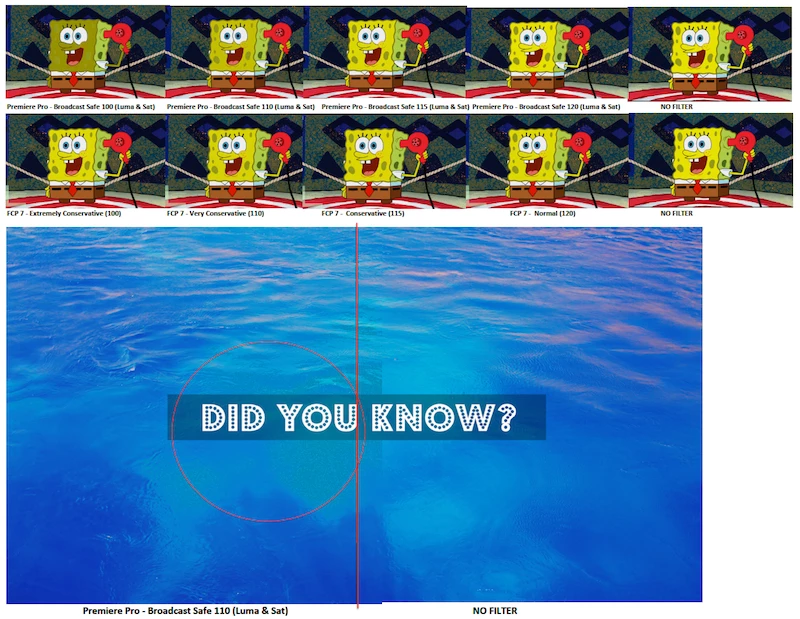
Can anyone explain to me how to use the Broadcast Color filter properly?  Before, when I was using FCP7, I just slapped on the Broadcast Safe filter and the edits passes the QC every time.  Now we've moved to Premiere Pro CC and I added the filter twice, once to set the luma and once to set the saturation (both default at 110).  The problem is that it completely changes the picture.  I get banding and the colour is noticeably clamped.  I've been working a lot with animations recently, so dealing with a lot of super saturated and bright colours.  If I set the broadcast filter to both 120 on luma and saturation, it doesn't look too bad.  Does anyone know at what number in the broadcast safe filter, will the become colour become not safe?  Can I get away with 120 on the luma and sat?  Please see images below: 
This topic has been closed for replies.

6 replies

Michael L at UNCP
Inspiring
August 13, 2018

I'm using the techniques mentioned above.

I pull an adjustment layer across the entire sequence, then drop the Levels effect on the adjustment layer. Then I set the White Output Level to 235 and the Black Output Level to 16.

Lastly, I review it in Lumetri Scopes with the RGB waveform and vector scopes just to be sure.

April 28, 2018

Similar filter in Effects/Video Effects/Color Correction/Video Limiter

JoyceCine
Participating Frequently
June 9, 2016

Hello!

Im super interested on this too.

It seems we are all waiting for some Broadcast Safe Filter in Premiere Pro CC.

Thanks!

chrisw44157881
Inspiring
June 9, 2016

color finesse will soft clip

"Color Finesse provides accurate luma soft-clipping, as well as color limiting to meet broadcast standards."

Color Finesse 3 PI – Synthetic Aperture

chrisw44157881
Inspiring
November 22, 2016

you can roll your own premiere broadcast legal preset with simple levels effect setting up two adjustment layers. one for luma, one for chroma. you can even put in soft clip!

example preset.

CreativeCOW

tihomirl56139086
Participant
September 23, 2015

Hello everybody,

can anybody tell me where I can find the Broadcast Save Filter in Premiere?

I can´t find it at all. I´m using Premiere Pro CC V 9.0...

Does the Broadcast Save Filter exist in Premiere Pro??

Somebody told me it doesn´t exist and I have to buy the external Plug In from

Eyeheight for GBP500...

Thanks for your answers,

Tiho

lbernier
Known Participant
June 21, 2015

Did you guys found a workaround?

I used to apply the broadcast safe filters in FCP7 set on Extremly Conservative (100) and passed the QC every time to.

When you say "Can I get away with 120 on the luma and sat?" Did you try it? Did you passed the QC since then?

When I look at your montage, I find the 120 settings still brighter, especially on the yellow, over the Extremly Conservative from FCP7. I think the 115 is closer to what FCP7 filter looks like. Anyway it's still above 100 IRE...


I just started working on a new TV Show and feel I can't trust the broadcast colors from Premiere. Our workaround is actually to export a HQ file whitout any filter from Premiere, then import the file in FCP7, apply the Broadcast safe filter then re-export with the broadcasters specs...


I hate to actually depends on FCP7 to feel safe about having broadcast safe colors without compromising that much the picture quality...

shooternz
Legend
June 21, 2015

The Levels Effect is one solution ( workaround) if you want a quick simple workflow.

Its never failed a Luma QC for me.

I actually apply it inside an Adjustment layer over everything...no matter what else I do to CC, Grade and legalise in other areas.

lbernier
Known Participant
June 21, 2015

What are your settings on the Levels effect?

I know broadcast colors are around 16 to 235 on a 8bit color depth, so I set my RGB output to match these values but it look desaturated and way less contrasty.

So do you also change your input values?

shooternz
Legend
January 9, 2015

I never use that BC Filter!

Test showed me its un reliable and it degrades the image.  Basically it uses a "keying" type approach and this can leave some very nasty visual remnants ( patches).

I use the traditional method of working with scopes ( Luma and RGB Parades) and levels  ( Levels Effect)  and processing in various CC Tools.

To legalise color I work on the individual chroma ( RGB Channels).  Red is usually the culprit that needs fixing.

The Levels Effect will automatically clip Luma.  I generally drop Whites to 95-98 to be safe.

Unfortunately in PPro or Speedgrade...there is no soft clipping available . THere is in Resolve.

TrashYourPrefs
Participant
January 15, 2015

Thanks for that!  Are there no decent third party plugins that anyone is using?  I currently have to use Resolve to make all my images broadcast safe, but it's not always ideal if I wasn't round-tripping with resolve in the first place.