
Participant
February 3, 2024
Question

How to apply different animation to a large number of pictures?

  • February 3, 2024
  • 2 replies
  • 639 views

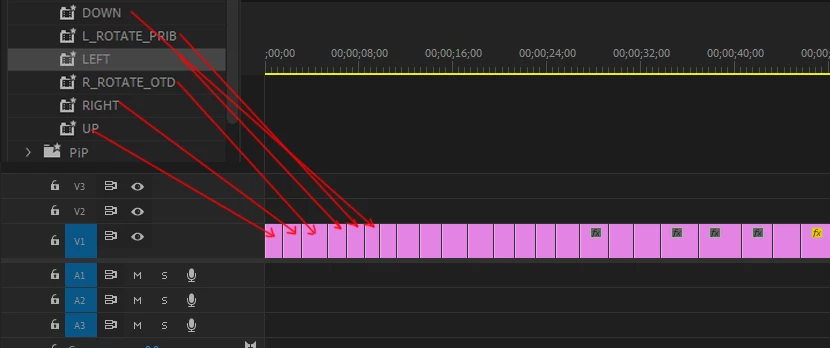
I have a problem where I need to animate a very, very large number of pictures. There are templates animations, and I need to apply them to all pictures, the templates are different, top to bottom, etc. One animation to apply one animation is not a problem, just select the pictures and apply to all of them, when you have them several then and begin to have problems, there are more than 500-1000 pictures in the project and manually throw over each picture templates is very tiring, perhaps there are other methods?
This topic has been closed for replies.

2 replies

Mathias Moehl
Community Expert
Community Expert
February 4, 2024

If you just want to move the images, my (paid) extension Automation Blocks might be helpful.

In particular the included Ken Burns Pan & Zoom tool could be helpful:


There are also tools to animate the selected layers in and out. By default, each of those tools just uses one style. But since all is based on block code, which you can modify, you could also write a custom tool, which picks one among your favorite animations randomly for each clip.

Mathias Möhl - Developer of tools like BeatEdit and Automation Blocks for Premiere Pro and After Effects
Participant
February 4, 2024

Wow, thanks, I'll be sure to check it out

Ann Bens
Community Expert
Community Expert
February 3, 2024

You can select multiple images and add one preset and that is it.

Might want to consider using Ae with this plugin:https://proloststore.com/products/burns


Participant
February 3, 2024

You mean select a few or all images and apply the preset? But the problem is that I have different patterns of animations of pictures, for example, the first picture moves from top to bottom, the next from left to right, the next from bottom to top and so on, when one animation pattern, for example, only from top to bottom, then yes just select all and apply, but unfortunately I still only manually for each picture apply different animation patterns, I do not even need a strict sequence, just the main thing that they were different, I'm afraid that what I want it is impossible

Ann Bens
Community Expert
Community Expert
February 3, 2024
quote, I'm afraid that what I want it is impossible

By @Saf352213968p1u


That is correct.

Use Ae as mentioned before or photomontage software.