Participant
December 27, 2017
Answered

how to cross dissolve with no handles

  • December 27, 2017
  • 2 replies
  • 2307 views

Here is my frustrating situation. I have an old wedding video in which the file is 1hr long and within this file there are numerous scene changes. I would like to add a cross dissolve in between these scene changes but when I cut the clip on the timeline and add a cross dissolve transition = premier just extends the clips past the original cut (adds handles) and the scene change falls in between the transition making an ugly jump-cut in the middle of the cross dissolve. The action I would like premier to do is; When I add a cross dissolve transition for that clip to keep its current length and just overlap the clips together. I don't mind if the length of the overall timeline gets reduce by this action. Can anyone help? 
This topic has been closed for replies.
Correct answer Meg The Dog

LuisDuque786  wrote

The action I would like premier to do is; When I add a cross dissolve transition for that clip to keep its current length and just overlap the clips together. I don't mind if the length of the overall timeline gets reduce by this action. Can anyone help? 

There is no automatic way to do what you want. Right now you are only doing half the process. Once you blade the current embedded cut point, you need to move the rest of the video forward by the duration of the dissolve (in other words, move the video past the cut point 30 frames earlier if you dissolve is 30 frames.

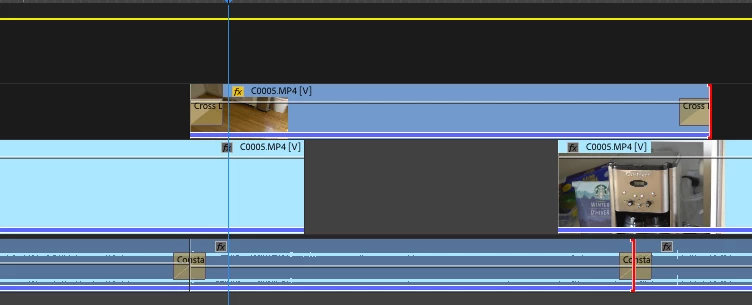
An easy way to do this is, after the cut, move the following video up one video track, then move it earlier in the timeline by 30 frames, then apply a cross dissolve the start of the upper track clip and it will dissolve in. At the next cut point, blade the cut, then move the following video down a track, move the following clip 30 frames earlier, and place a cross dissolve on the end of the upper clip:

If you want/need you can apply cross dissolves to the audio. Repeat as necessary.

MtD

2 replies

Ann Bens
Community Expert
Community Expert
December 27, 2017

Cut the clip

Add cross dissolve

Select Ripple Trim

Ripple trim in to end transition or desired frame

Ripple trim out to end transition or desired frame.

Meg The DogCorrect answer
Inspiring
December 27, 2017

LuisDuque786  wrote

The action I would like premier to do is; When I add a cross dissolve transition for that clip to keep its current length and just overlap the clips together. I don't mind if the length of the overall timeline gets reduce by this action. Can anyone help? 

There is no automatic way to do what you want. Right now you are only doing half the process. Once you blade the current embedded cut point, you need to move the rest of the video forward by the duration of the dissolve (in other words, move the video past the cut point 30 frames earlier if you dissolve is 30 frames.

An easy way to do this is, after the cut, move the following video up one video track, then move it earlier in the timeline by 30 frames, then apply a cross dissolve the start of the upper track clip and it will dissolve in. At the next cut point, blade the cut, then move the following video down a track, move the following clip 30 frames earlier, and place a cross dissolve on the end of the upper clip:

If you want/need you can apply cross dissolves to the audio. Repeat as necessary.

MtD

Participant
December 27, 2017

I used to edit with another program that would do this really simply so I thought Premier would do it too. Thank you so much for the answer. Ill give it a try.