
Participating Frequently
July 7, 2026
Answered

How to delete custom bin from Effects panel

  • July 7, 2026
  • 4 replies
  • 67 views

In effects panel, by mistake i have created custom bin folder. But now i cant delete it. Is there any way to delete it?

    Correct answer caroline_edits

    Here’s where the presets are stored!

    Open your file explorer (PC) or Finder (Mac)

    Navigate to Documents > Adobe > Premiere > 26.0 > profile-[name]

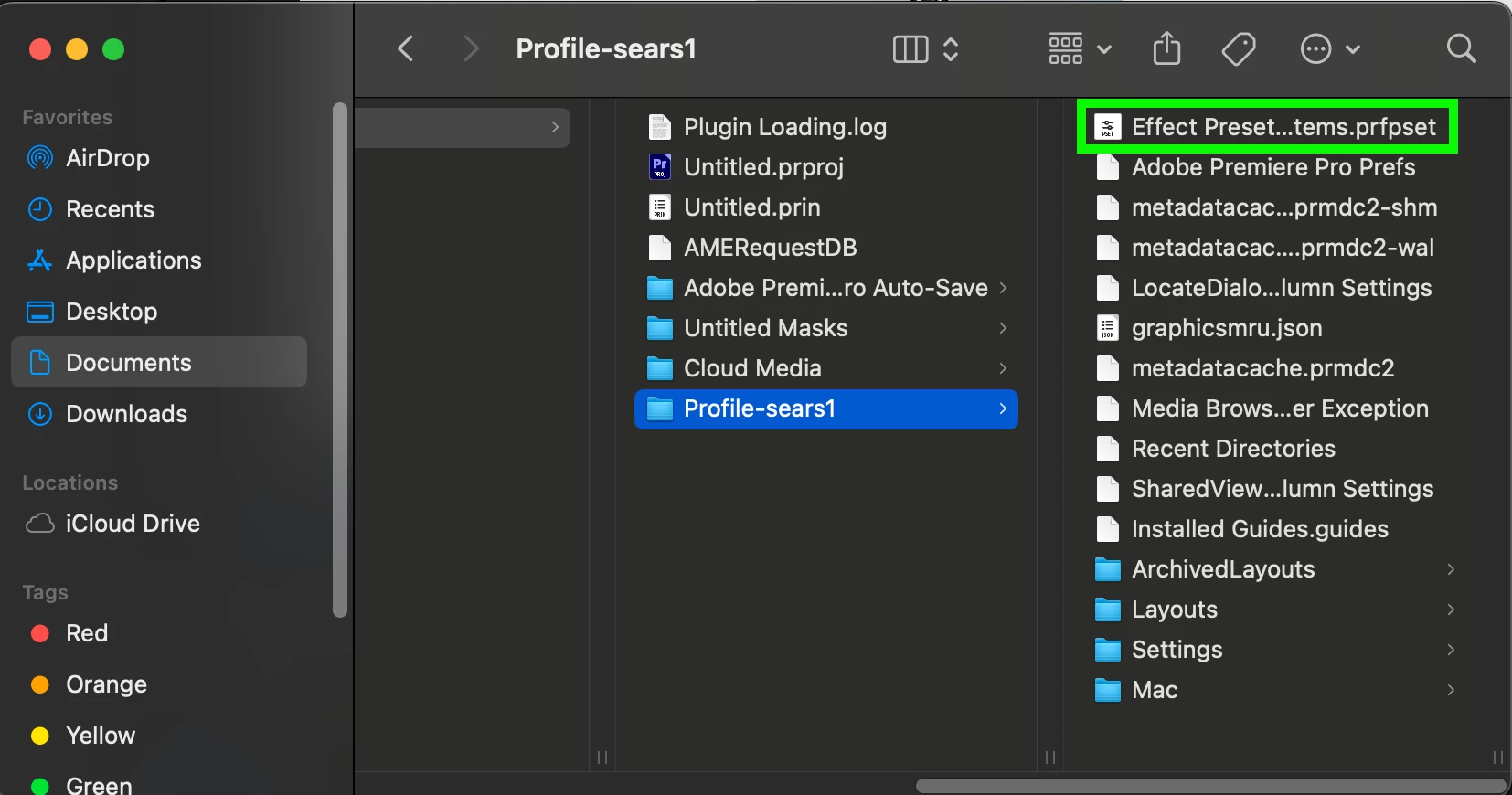
    There is a file in the profile folder that ends in .prfpset

    The .prfpset file can be deleted to remove the Custom Bin from the Effects panel.

    Restart Premiere after you delete the .prfpset file to see the Custom Bin removed from the Effects Panel.

    Here’s a screenshot of what it looks like on a Mac.
     

    4 replies

    Peru Bob
    Community Expert
    Community Expert
    July 7, 2026

    See here starting at 1:56 


    Participant
    July 7, 2026

    I’m having this same issue. I must have accidentally hit new custom bin repeatedly, but I cannot delete them. 

    Backspace doesn’t work, when I right click Delete is unavailable, and the trash can in the bottom right of the panel is greyed out and unresponsive. I tried going into adobe documents and deleting Effect Presets and Custom Items.prfpset then restarting premiere but it somehow persists even then

    I’m on Mac OS Tahoe 26.5.1
    M5 Max chip
    Premiere version 26.3.0


    Participating Frequently
    July 7, 2026

    THIS SAME IS HAPPENING EVEN IN WINDOWS


    Community Expert
    July 7, 2026

    Click on the bin then hit the back space or delete key. Then confirm that you want to delete the item.

    Participating Frequently
    July 7, 2026

    Not working 

    Community Expert
    July 7, 2026

    Are you on Mac or Windows? it just  worked fine for me on Windows.

    Peru Bob
    Community Expert
    Community Expert
    July 7, 2026

    You will have to go to the folder on your computer where presets are stored.

    What version number of Premiere and what operating system?

    Participating Frequently
    July 7, 2026

    Latest 2026

    caroline_edits
    Community Manager
    caroline_editsCommunity ManagerCorrect answer
    Community Manager
    July 21, 2026

    Here’s where the presets are stored!

    Open your file explorer (PC) or Finder (Mac)

    Navigate to Documents > Adobe > Premiere > 26.0 > profile-[name]

    There is a file in the profile folder that ends in .prfpset

    The .prfpset file can be deleted to remove the Custom Bin from the Effects panel.

    Restart Premiere after you delete the .prfpset file to see the Custom Bin removed from the Effects Panel.

    Here’s a screenshot of what it looks like on a Mac.