Participating Frequently
June 16, 2024
Answered

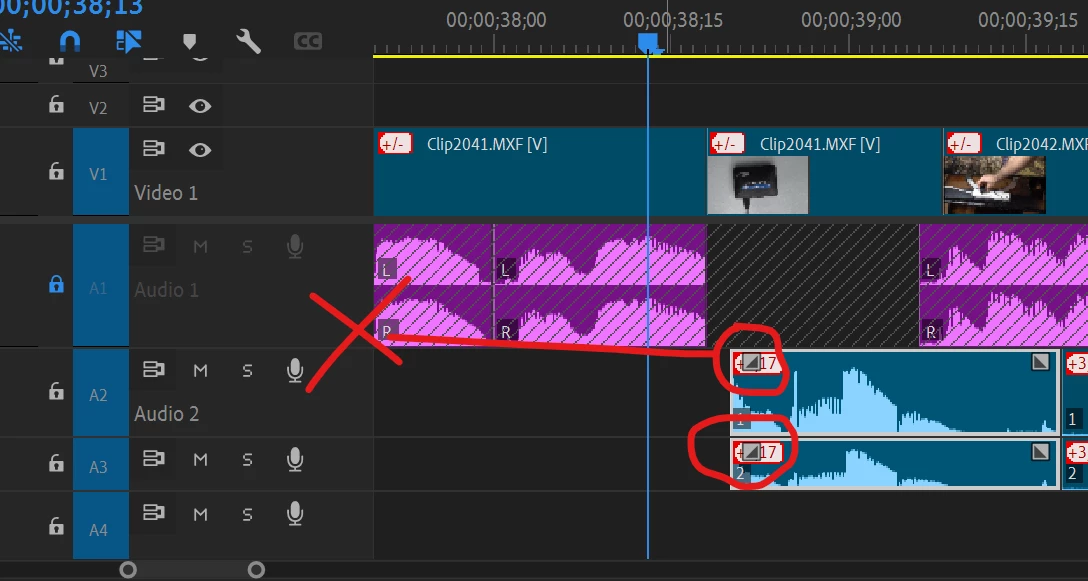
How to disable square grey box icon on Audio Files on Timeline in Premiere Pro?

  • June 16, 2024
  • 1 reply
  • 874 views

Whenver I hover my cursor over the audio file or select an audio file, a very annoying greybox icon appears as shown in the picture below.  How can I disable this grey box icon from appearing on the audio files? Thanks. 
 

This topic has been closed for replies.
Correct answer Ann Bens

You cannot disable, they are the new audio transition handles.

Adobe fixed this in the beta.

If the track is minimized, the handle disappears and the out of sync icon stays.

1 reply

Ann Bens
Community Expert
Ann BensCommunity ExpertCorrect answer
Community Expert
June 16, 2024

You cannot disable, they are the new audio transition handles.

Adobe fixed this in the beta.

If the track is minimized, the handle disappears and the out of sync icon stays.

Participating Frequently
June 16, 2024

Thanks for your quick response. How to minimize the tract? Thanks. 

Ann Bens
Community Expert
Community Expert
June 16, 2024

Open the wrench in the timeline.