

yash-lucid
Inspiring
January 31, 2025
Question

How to easily manage 2 subtitle styles?

  • January 31, 2025
  • 1 reply
  • 358 views

I have 2 subtitle styles, red/white for main speaker, yellow/black for others.
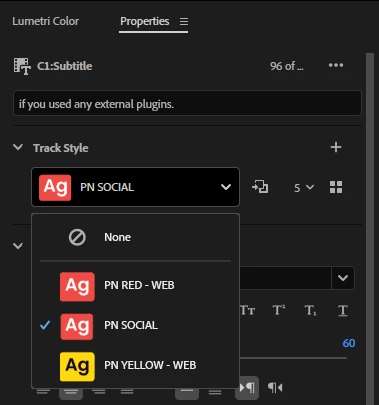


When I select all the ALTERNATE speakers and select the YELLOW track style, it changes EVERY caption style on the sub.


The only way to change all the ALTERNATE SPEAKER captions to yellow is to select them all, and manually change fill (copy hex code, paste), manually change background (copy hex code, paste) and repeat for subsequent videos.


Surely there is an easier way? Even a singular copy paste?
Reminder: Changing the track style once, change it for all captions.
Edit: I tried using 2 tracks, one with red track style for main, one with yellow track style for alt speakers, however PPro only allows one to be visible. Toggling visibilty on one, turns it off for the other.

1 reply

Adobe Employee
January 31, 2025

Hi yash-lucid,


Welcome to the community! Could you please confirm the version of Premiere Pro that you are using? You may also try this workaround to see if it helps. Select all the content of any of the two caption tracks & navigate to Graphics and Titles > Upgrade Caption to Graphic. This converts the content of that caption track to Graphics, which you can display along with the other caption track. Hope you find it useful.


Thanks,

Sumeet

yash-lucid
Inspiring
February 2, 2025

Hi.

Latest Ppro (25.1.0)

The solution technically works, but man it's quite clunky. 

Now my main captions are in the captions layer, and my alternate speaker captions are in a video layer as a graphic above my effects layers. It works but it feels off.


If I ever have to revisit it to adjust grammar for reverts, now those captions are not available for updating using the TEXT panel, nor are they searchable anymore.


Additionally, once I duplicate my sequence to make mobile 9x16 cuts, I will have to scale those text layers separately in an extra step, instead of having it all accessible via the properties panel.


It works for now,  it's a really clunky workaround, but thanks.