This topic has been closed for replies.
Correct answer kavianfm

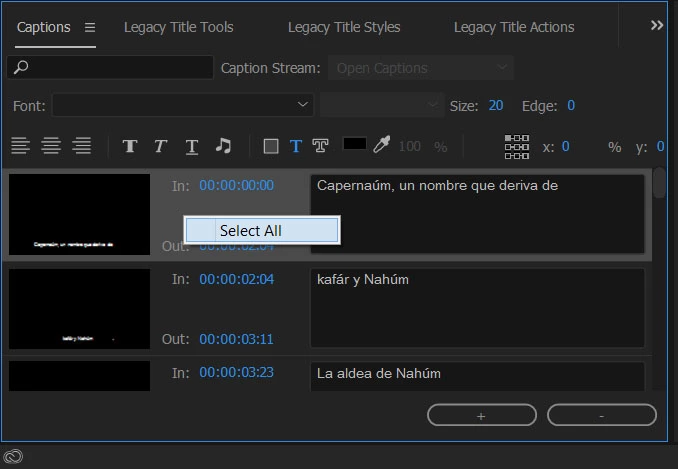
You can easily change the font and position for all subtitles at once in Adobe Premiere.

Right click on the In & Out section and then Select All.
5 replies

jdanielmurphy
Participating Frequently
March 8, 2022

If you double-click one of the captions on the Subtitle track, it'll bring up Essential Graphics (if you don't already have it up). Edit the one how you want it, then go to Track Style and save it how you want.


Then go back to the Subtitle track on the Sequence and right-click in the blank area, selecting Track Settings...

Select your saved Style from the drop-down, and it'll apply to all captions/subtitles on the track.

Participant
May 3, 2022

Thank you soooooo much for this. You just saved me so much time you have no idea. 

Participant
October 14, 2020

After selecting all and edtiting the size, the font size or font family do not change. Does anyone else has this error? and a fix?

Stan Jones
Community Expert
Community Expert
October 14, 2020

What type of caption stream? And not all fonts are supported. Screenshots might help.


Stan

kavianfmCorrect answer
Participant
August 14, 2017

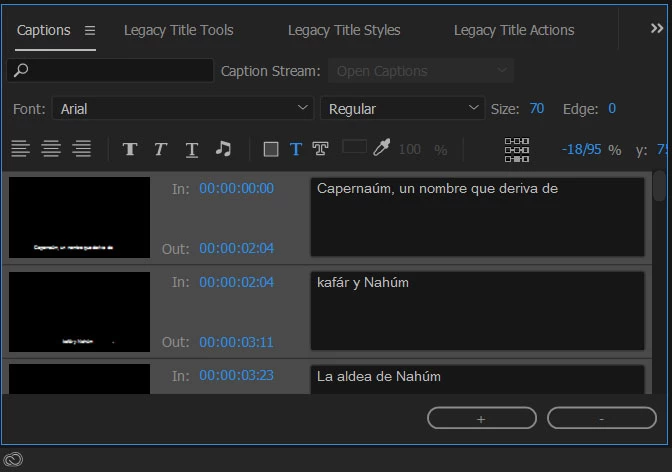
You can easily change the font and position for all subtitles at once in Adobe Premiere.

Right click on the In & Out section and then Select All.
Known Participant
June 28, 2018

Thank you, thank you....and on a million more times!

Participant
June 28, 2018

It's my pleasure to help you!

Legend
February 2, 2017
Participant
February 2, 2017

Thanks Jim. It's good to know that I'm not the only one struggling.... Unfortunately there's no solution so far. I sent a feature request as well.

Ann Bens
Community Expert
Community Expert
February 2, 2017

or do I have to change them one by one?

Unfortunately yes.

Feature Request/Bug Report Form

Participant
February 2, 2017

Thanks Ann. It gonna be a very long day...
