
Known Participant
June 13, 2022
Question

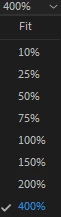
How to edit "Select Zoom Level'' options

  • June 13, 2022
  • 4 replies
  • 3695 views

Is there anyway for me to edit the options in the "Select Zoom Level'' drop down box. The zoom only goes up to 400% and for high qulity videos that I need to edit close to pixel perfect is pretty hard to do with this limition. I would like to add more zoom options or increase and decrease the options already there. Is there a setting or pluggin that can do this?
This topic has been closed for replies.

4 replies

Ann Bens
Community Expert
Community Expert
June 14, 2022

Use the 'Toggle full screen' (ctrl + `) option to get more zoom.

Known Participant
June 14, 2022

That might help. Thanks

Community Expert
June 13, 2022

Unfortunately this is determined by Premiere and is not consistent with different video formats. There is no way to change this setting.

Known Participant
June 14, 2022

It's a real shame. Premiere's Editing feels very rigid compared to Photoshop. I really with Adobe would combine the tools of some of these softwares. It's really annoying having half the tools you need on one software, and the other half on another software and the encoding needs to be finished on another software.

Warren Heaton
Community Expert
Community Expert
June 17, 2022

For what it's worth, Photoshop has a video timeline.  

Premiere Pro’s strength is assembling video, not composting (layering).  That part is for After Effects.  With Dynamic Link, it is very easy to send a clip or clips from a Premiere Pro Sequence to an After Effects Timeline.  

nishu_kush
Community Manager
Community Manager
June 13, 2022

Hi Julian,


Welcome to the community.

Is 400% the max you can go? I can go up to 1600%.

Could you share the exact version of After Effects you're using? Also, what are your system specifications (CPU, GPU, RAM, OS version)?

Let us know, we're here to help.


Thanks,

Nishu

Community Expert
June 13, 2022

They are in Premiere 🙂

Community Expert
June 13, 2022

Natively that's what you get. Not sure about plugins. If you are trying to do things that precise in the Program Monitor I wonder if After Effects is a better option for you?

Known Participant
June 14, 2022

I tried using after effects actually. The problem is, it doesnt allow multiple video editing. In other words. I cant add other videos to the same timeline. After Effects is is used to add effects after you're finished with the basic editing of the video. The reason why I need to be able to zoom in more is so I could make finer adjustments; near pixel perfect.