

Known Participant
February 12, 2026
Question

How to edit the captions mins and seconds in captions tracks and in timeline

  • February 12, 2026
  • 2 replies
  • 53 views

Hi, there how to edit the captions timeline mins and seconds in captions tracks and in timeline mins and seconds for caption and from captions track Thanks Kevin
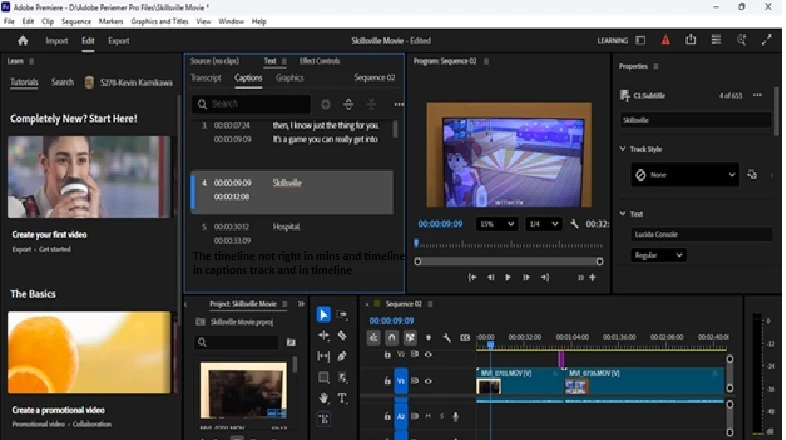
The timeline not right in mins and timeline in captions track and in timeline check in Adobe Premiere Pro 2026


    2 replies

    Stan Jones
    Community Expert
    Community Expert
    February 16, 2026

    @Sammy Red the Betta Fish,

    I don’t see a way to directly edit the timecodes themselves. You can drag the ends of the captions in the timeline to change the beginning and ending timecodes.

    It is a bit of a clumsy workaround, but set the timecode you want in the timeline. The playhead moves to that point. Select the end of the caption you want to move to that timecode. Use the Extend to playhead shortcut. See this post:

    Stan


    Stan Jones
    Community Expert
    Community Expert
    February 12, 2026

    @Sammy Red the Betta Fish,

    I’m not sure what you are asking. Are you wanting to edit the beginning/ending timecode of captions by typing timecodes?

    I assume you have intentionally hidden your caption tracks in the timeline. If not, in the timeline, in the top of the track header area, click CC and pick Show all caption tracks.

    Stan


    Known Participant
    February 15, 2026

    Hi there, how to edit the captions mins and seconds in captions tracks and in timeline mins and seconds for caption and from captions track Thanks Kevin

    Sammy the Red the Betta fish