c1981
Participant
June 19, 2017
Answered

How to edit video track by single frames?

  • June 19, 2017
  • 2 replies
  • 539 views

I have googled this and searched forums and cannot find an answer to this issue.

I am trying to create a slideshow/video with still images that are precisely timed with cues in an audio track, but the video/pics will only move on the track in increments of a full, single second. I need to be able to move and trim objects in the video tracks with much more precision, and it seems that I could do this by editing by single frames, but it won't let me get that precise.

Please halp!
    This topic has been closed for replies.
    Correct answer Meg The Dog

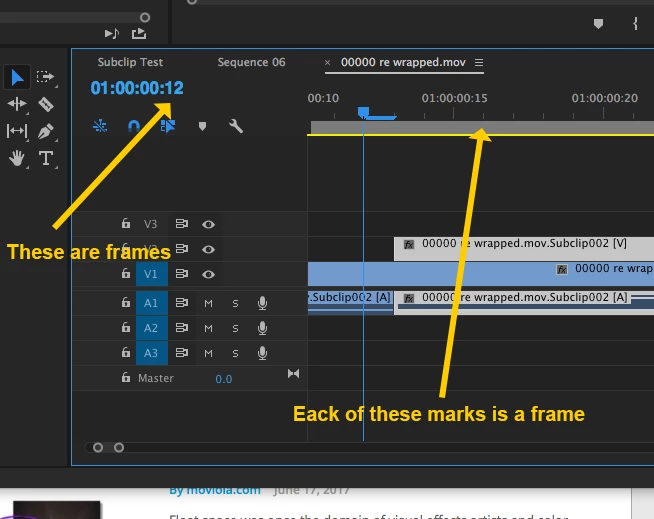
    Are you perhaps confusing the frame markers on the timeline for seconds?

    The last two numbers of the Playhead Position indicator are reading frames.

    Each one of those small gray lines on the timeline ruler is a frame.

    MtD

    2 replies

    Ann Bens
    Community Expert
    Community Expert
    June 19, 2017

    If you want to edit on more on frame level you need to zoom in on the timeline.

    Meg The DogCorrect answer
    Inspiring
    June 19, 2017

    Are you perhaps confusing the frame markers on the timeline for seconds?

    The last two numbers of the Playhead Position indicator are reading frames.

    Each one of those small gray lines on the timeline ruler is a frame.

    MtD

    c1981
    c1981Author
    Participant
    June 20, 2017

    Indeed, I was confused. I was focusing too much on what the audio was doing and making assumptions based on a non-adobe program I used many many years ago. That program (I forget the name) allowed you to move anything on a track freely, so you could very precisely align the wav forms with imagery. Adobe doesn't work that way, but when I play back the project I'm doing, it's not too bad. Thanks for taking the time to respond!

    Ann Bens
    Community Expert
    Community Expert
    June 20, 2017

    You can still edit the wav forms (audio) to the video.

    Set the timeline to Audio Units (hamburger menu) and you can edit the audio 1/48000 of a second.

    Video is frame by frame, you cannot change that.