
Participating Frequently
May 15, 2017
Answered

How to expand tools panel??

  • May 15, 2017
  • 12 replies
  • 13607 views

I recently upgraded to Premiere Pro CC2017, and I'm growing increasingly frustrated by the condensed tools panel with the missing/hidden buttons.

I want to expand the tools panel so that I don't have to use keyboard shortcuts or click and hold to switch tools. I noticed that a lynda course instructor was using the CC2017 version with an expanded tool bar:
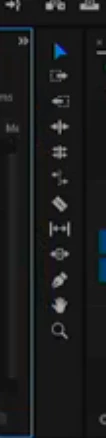
Please help! I can't find this anywhere in the preferences or panel settings!

This topic has been closed for replies.
Correct answer kulpreet singh

Hi BHiser,

I want to expand the tools panel so that I don't have to use keyboard shortcuts or click and hold to switch tools.

I am sorry but you cannot expand the tools panel. (This is how it has been designed.)

The Latest (and Greatest!) for Premiere Pro CC and Media Encoder | Creative Cloud blog by Adobe

I noticed that a lynda course instructor was using the CC2017 version with an expanded tool bar:

The tools panel has been redesigned in the latest version of CC2017. I am sure that you are following a tutorial from a previous version of CC2017.

Please share your valuable feedback here.

Thanks,

Kulpreet Singh

12 replies

shooternz
Legend
May 15, 2017
I am sorry but you cannot expand the tools panel. (This is how it has been designed.)

Lets add some steps  and hoops for the editors to work with,  ...dumb and pointless by design!

Known Participant
June 12, 2018

More signs that adobe is being run by idiots. This is a seriously idiotic design change. Why don't these idiots give editors the options of using t hings the way they are used to. The new crappy version of the tool panel could easily been an option in the preference. I just lost an hour trying to figure out where the freaking ripple edit tool went when I tried a project in 2k18 because it the features I needed to use were too buggy in earlier versions.

kulpreet singh
kulpreet singhCorrect answer
Inspiring
May 15, 2017

Hi BHiser,

I want to expand the tools panel so that I don't have to use keyboard shortcuts or click and hold to switch tools.

I am sorry but you cannot expand the tools panel. (This is how it has been designed.)

The Latest (and Greatest!) for Premiere Pro CC and Media Encoder | Creative Cloud blog by Adobe

I noticed that a lynda course instructor was using the CC2017 version with an expanded tool bar:

The tools panel has been redesigned in the latest version of CC2017. I am sure that you are following a tutorial from a previous version of CC2017.

Please share your valuable feedback here.

Thanks,

Kulpreet Singh