
Answered
How to export at 720 60p
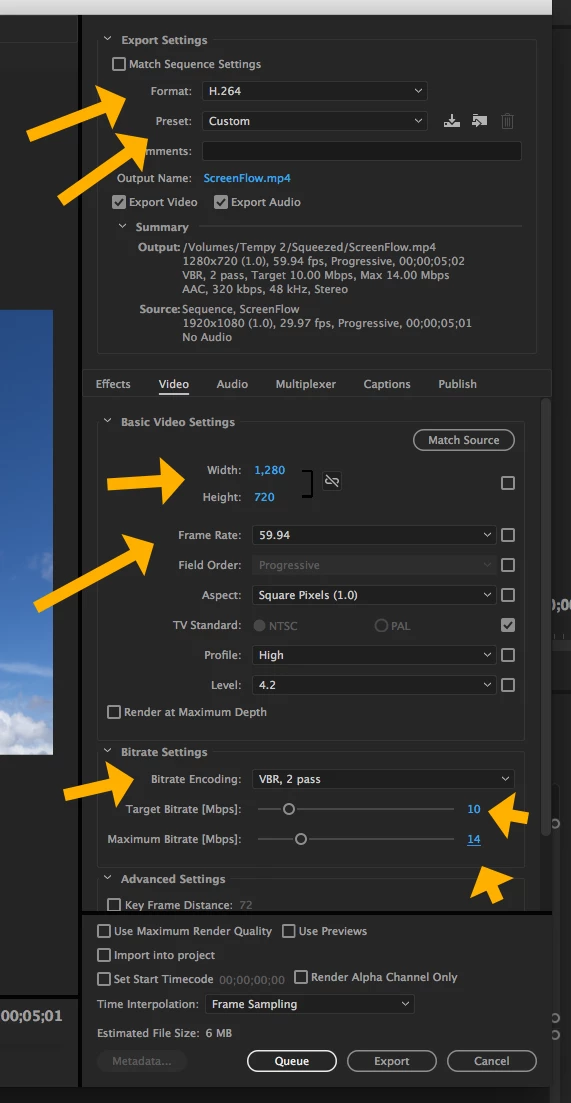
I am very new to PP. I have the newest version of it. I like to use 720 60p as my finished project for what I do. When I export it I then put it on our local TV station that we have in school. Anything of higher quality would be a waste and I've found that 720 60p is more CPU and GPU friendly. Just my opinion though. I can't seem to find anything that exports to those settings? MP4 or Mpeg2 don't have it and that is what I have used in the past with Vegas Pro. I can use H.264 Blu Ray but then it takes audio and separates it from the video. I may be missing something so if anyone could steer me in the right direction I would be grateful. Thanks.
 AdChoices