


How to export to GoPro site from Premiere: Export -> Destinations?
I use Quick Desktop for Mac to upload my GoPro videos; I can't use their web page to do so as it is full of non-GoPro videos and requires more storage. I get around this by converting my video to GoPro format, and uploading with Quick Desktop for Mac, but they've discontinued that program:
"Quik Desktop for Mac will be removed from the App Store on Dec. 31. For GoPro customers who prefer editing on desktop, we plan to release updated versions of our 360 plug-ins for leading desktop editors like Adobe Premiere and After Effects."
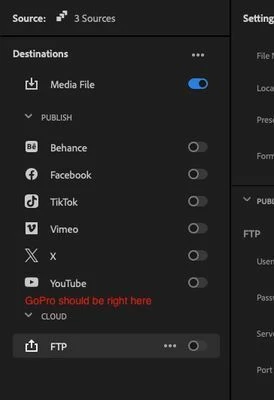
I downloaded their plug-in, installed it, re-started Premiere, but it doesn't show a GoPro option in the Export settings (I see Behance, Facebook, TikTok, Vimeo, X, and YouTube; I expected to see a GoPro after installing their plug-in.)
Does anybody else upload to GoPro from the Import -> Destinations in Premiere? Is that even a thing? I don't want to upgrade my GoPro subscription if I don't have to.
 AdChoices