Participant
November 22, 2018
Answered

How to export video to be framesize of 13457x1200px

  • November 22, 2018
  • 4 replies
  • 491 views

Hi All,

After updates the new premiere pro is much better!

Im trying to create a video that is 13457x1200px. I can change the frame size however I can't seem to export it in this size. The video format needs to be MP4, MOV, Quicktime, Webm?

Any suggestions?

Thanks
    This topic has been closed for replies.
    Correct answer MarekMularczyk

    You can make your Sequence (video) any size you want. When you make a new sequence in Premiere, choose any preset and then go to Settings tab.

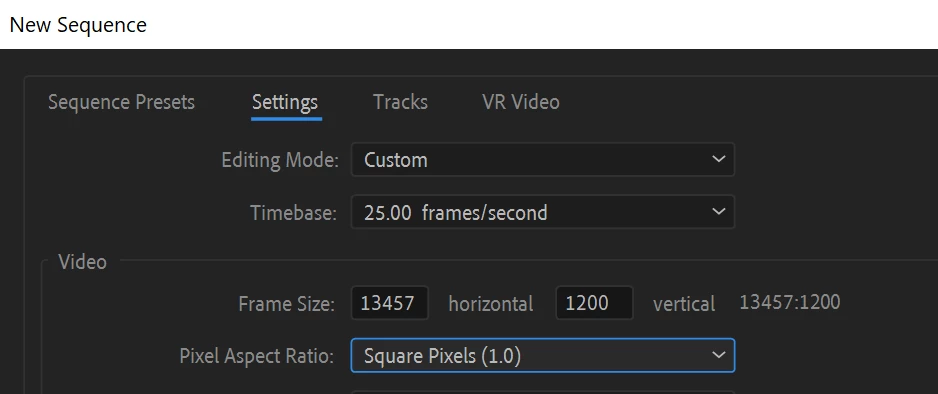
    In Settings tab choose Editing Mode of Custom and set your size:

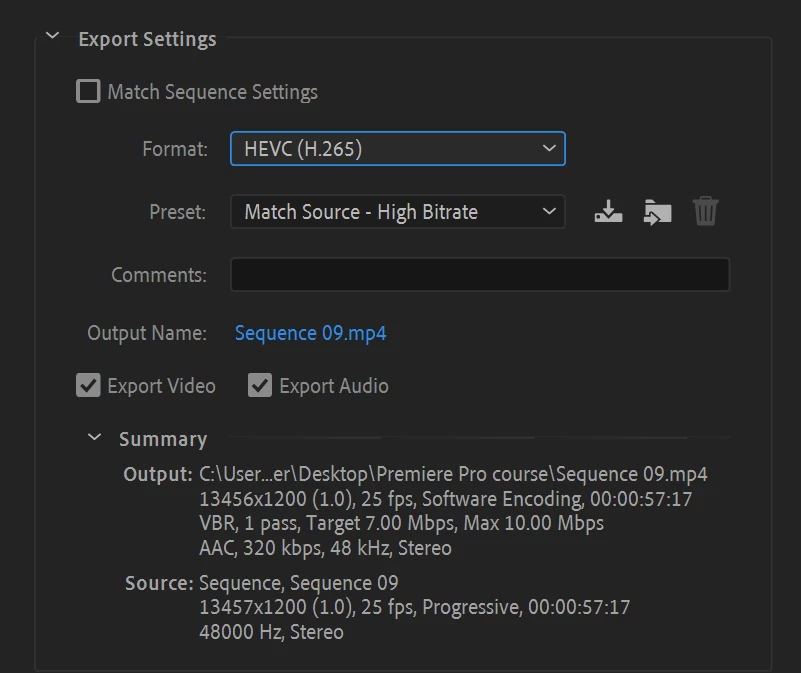
    Then, when you export export as MP4 using H.265 codec:

    4 replies

    Legend
    November 22, 2018

    You have two challenges here.

    First, MPEG formats typically need to be evenly divisible by 8, so 13,456 is the better option.

    Second, there are no MPEG formats that allow such a high resolution, so even that won't work.

    You may have to change your needs here.

    imeilfx
    Inspiring
    November 22, 2018

    Not being able to export to that resolution is not because of Premiere Pro, not because of Adobe Media Encoder and not even because of container (mov,mp4 etc.) but because of some codecs restrictions. You have to use codec that can handle that resolution.

    Mo Moolla
    Legend
    November 22, 2018

    Oops I just saw this was replied to and sorted

    MarekMularczyk
    Community Expert
    MarekMularczykCommunity ExpertCorrect answer
    Community Expert
    November 22, 2018

    You can make your Sequence (video) any size you want. When you make a new sequence in Premiere, choose any preset and then go to Settings tab.

    In Settings tab choose Editing Mode of Custom and set your size:

    Then, when you export export as MP4 using H.265 codec:

    Adobe Community ExpertAdobe Certified Professional