



AndrewTheGreat
Known Participant
March 26, 2026
Question

HOW TO? Feathered blur using Compound blur effect

  • March 26, 2026
  • 2 replies
  • 26 views

I’m trying to make an effect of a sound wave. There’s a guy in the center of the screen and when he yells, there are air-distorting waves coming out of his mouth at a high frequency. 

Something like this:
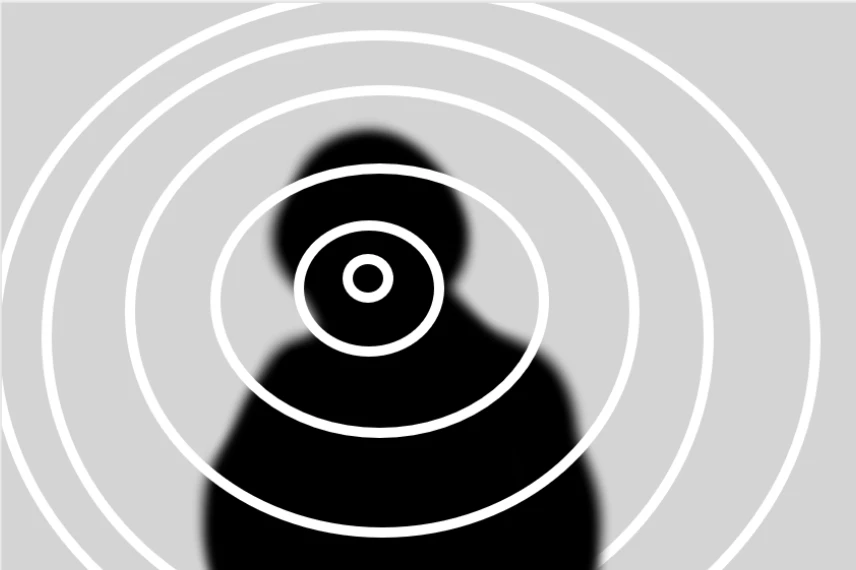
To create this effect I’m using a combination of animated stroked circles (graphics layer) of a black color and a compound blur targeted on this graphics layer. The problem I need to fix is make the strokes feathered. I tried the compound blur settings (there’s a feather), 2 rounded crops on a black solid (one - inverted, both feathered, blur to blur the stroke. Nothing makes the circles have soft edges. Any ideas? Maybe a different technique?

No AE. NO AE.

    2 replies

    Community Expert
    March 28, 2026

    If you created your circles using Shape layers, try using a shadow effect instead of a stroke to achieve soft edges.
     

    Use the following settings as a starting point:

    • Opacity: 100
    • Angle: 0
    • Distance: 0
    • Size: Controls the thickness of the line around the circle (you can combine this with a stroke if you need more thickness)
    • Blur: Controls the amount of feathering on the edges
    AndrewTheGreat
    Known Participant
    March 31, 2026

    Hi, ​@PaulMurphy 

    Nope, it gives the same result - the edges of the blur are harsh. Here’s the circle with a couple of drop shadows and the resulting compound blur ring


    Stop trying to edit and EDIT!
    Ann Bens
    Community Expert
    Community Expert
    March 26, 2026

    If you uploaded the layers separately we could have a go.