


Legend
November 24, 2025
Question

How to fix clip operations like replace or reveal not working?

  • November 24, 2025
  • 3 replies
  • 842 views

Hi there,


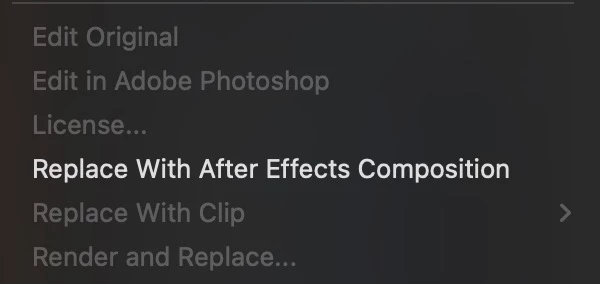
All of a sudden today, clip operations for many psds in my project are greyed out (see attached). As a result all my shortcuts for Replace and Reveal no longer work.


Have tried:

  • Restarting Premiere
  • Deleting cache for all projects and restarting Premiere
  • Resetting preference and restarting Premiere
  • Resetting the workspace to saved
  • Trying a default workspace
  • Restarting the Mac


I see no warnings or alerts that any media is missing and neither the project or media has been moved - but after performing the above, Replace and Reveal is greyed out for all clips.


Does anyone know how to troubleshoot and fix?


Any help much appreciated. Cheers, Ben


- M4 Macbook Pro

- MacOS 15.7.2

- Premiere 25.6.2 (build 1)
 

865739i04E2609E5A2FD103.jpg

3 replies

December 6, 2025

If Replace and Reveal are greyed out, it usually means Premiere no longer sees those clips as file based media. This happens when PSDs get interpreted as Sequences instead of single files.

Try this:

Right-click the PSD > Modify > Interpret Footage > Make sure it's set to “Merge all layers.”

If the PSD is opening as a sequence, remove it and re-import, making sure “Import as > Footage” is selected.

Test on a fresh timeline sometimes an old timeline corrupts the clip state.

This almost always brings Replace/Reveal back.

csscmsAuthor
Legend
November 24, 2025

Ok, so have now...

  • Deleted all preferences, profiles, and application support files
  • Deleted Premiere
  • Restarted Mac
  • Reinstalled Premiere
  • No joy


Weirdly, the issue only affects some .psd files. At first I thought there was a difference in how the psds were imported but both were deleted from the project and freshly imported with merged layers.


The Replace clip options show for one psd but is greyed out for another. I've never seen this before, hopefully I'm missing something basic here?


Any help much appreciated. Cheers, Ben

csscmsAuthor
Legend
November 24, 2025

It doesn't seem to be the imported PSD but rather, the clip on the timeline - I can replace other clips with the same imported PSD.


Have I somehow locked the timeline clip with an accidental shortcut? I don't see a clip lock icon (the track isn't locked either) and don't see anything in the Clip menu that might indicate this - any ideas much appreciated.


Cheers, Ben

Adobe Employee
November 24, 2025

Hi Ben,

Please check that the Project panel is in focus & you have a clip selected in the Project panel before using the Replace With Clip command. 


Thanks,

Sumeet

Community Expert
November 24, 2025

Are all of your apps up to date?

csscmsAuthor
Legend
November 24, 2025

Thanks @RobShultz - yes, all Adobe apps installed are on the latest version, updated 8 days ago.