

Participant
March 25, 2025
Question

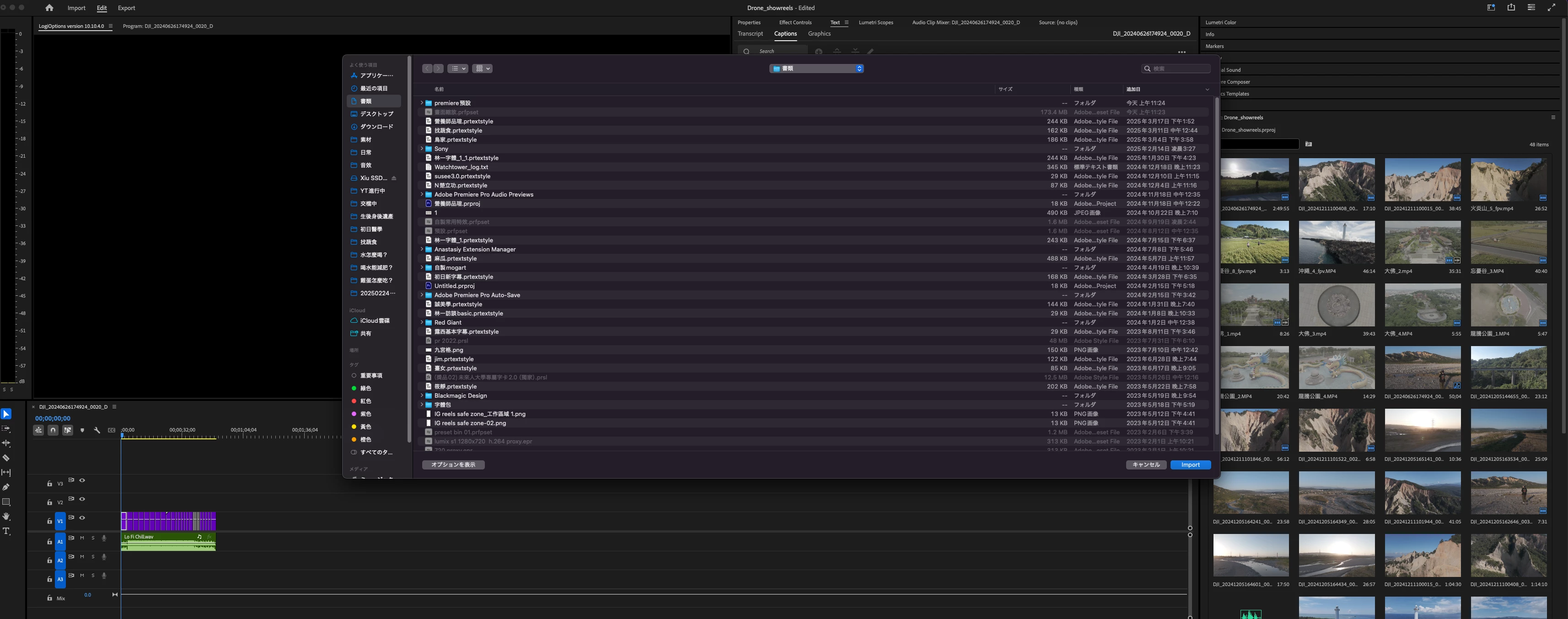
How to fix the issue where the import and export windows switch from English to Japanese

  • March 25, 2025
  • 4 replies
  • 246 views

Hi Team, is there any way to fix the issue where the import and export windows switch from English to Japanese?

4 replies

Ann Bens
Community Expert
Community Expert
March 25, 2025

Uninstall program

Select language in your CC desktop app (Panel menu > Preferences > Apps)

Reinstall.


If that does not work: reset preferences.


If this is AME window: Set language in AME preferences.

hua_2237Author
Participant
March 25, 2025

I have already tried uninstalling and follow the step above.
The language displayed during general use is English, but the options that pop up when import and export text still appear in Japanese.

Even the entire Finder sidebar options turn into Japanese. I’m not sure if anyone else has encountered the same issue.


Ann Bens
Community Expert
Community Expert
March 25, 2025

If I understand correctly, you want Premiere completely in Japanese?

Is your OS English or Japanese?