
Ian-SAfc
Inspiring
September 30, 2019
Question

How to get Multi-channel audio for Premiere CS6 (multi-language mp4 needed) ?

  • September 30, 2019
  • 5 replies
  • 3362 views

In CS6 I have the Sequence set up properly.

However, it did only let me select mapping when I chose "Adaptive" audio mode.


I have 4 audio tracks, which are actually 4 different languages, so its a multilanguage h.264 MP4 I am trying to make.

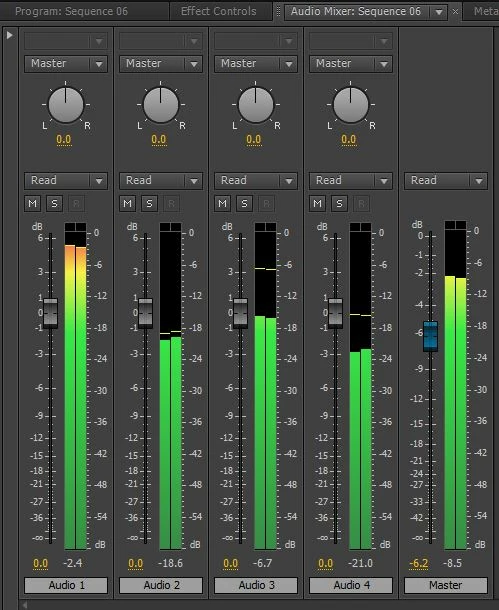
In the audio mixer it looks fine with the 4 audio tracks going to 4 separate stereo audio channels.


But when I export it as Quicktime H264 MP4 it mixes it all down to one audio track so all languages play togethre at the same time.


Any advice ?


(I have Final Cut X too, so I may look into that, but I sense I am agonisingly close with Premiere!)
    This topic has been closed for replies.

    5 replies

    Brandon Loshe
    Legend
    September 30, 2019

    As I look into this more, I'm not sure CS6 can do what you're going for. If you're trying to play only one track at a time through a player like VLC, then I believe the technical term is "streams," which you can do from the Creative Cloud versions of Premiere. Here are the export settings that you would use for that in CC:

    which allow you to do this in VLC:

    Unfortunately I'm not seeing a way to do that in the CS6 version, like I assumed it could do. Technically, the exported video file from CS6 Premiere Pro does have multiple audio channels, but VLC does not give the option to only play one at a time for that file.


    Participant
    April 13, 2022

    How can we label or rename the various audio streams?

    You see how in VLC (above) all audio tracks say English. .. Well I want to label/name those streams to the language they actually are. 

    How can this be done? 

    Thank you for any assistance.

    Jason

    Ann Bens
    Community Expert
    Community Expert
    April 13, 2022

    In CS6 you can rename but not color label.

    Brandon Loshe
    Legend
    September 30, 2019

    Here is what your master track should look like (apparently the new forums don't let me include pictures to inline responses).


    Ian-SAfc
    Ian-SAfcAuthor
    Inspiring
    September 30, 2019

    Great thanks, mine is showing that now.

    However, I export it as 16 channel and in the Player, it plays all the channels at the same time, I want to be able to select which channel is played in the player.

    This is because the MP4 file is to be multi-lingual.

    Brandon Loshe
    Legend
    September 30, 2019

    Hi Mr_Bansaw,

    I was about to say what Richard_M_Knight said. Your sequence settings should look something like this:

    In CS6 you can export multi-channel audio with QuickTime if you select uncompressed under the audio tab. I'll show two screenshots below.


    Ian-SAfc
    Ian-SAfcAuthor
    Inspiring
    September 30, 2019

    Just to add, I think this symbol should not show stereo:

    Brandon Loshe
    Legend
    September 30, 2019
    Correct, it should show a number, not the stereo symbol.
    Community Expert
    September 30, 2019

    Your master track is only stereo, you will need to setup a sequence with 8 outputs for your 4 stereo lanuage tracks.

    Community Expert
    September 30, 2019
    I now see you are on CS6, it might not be possible with that version, I can't remember when the multi channel output was introduced.