How to get nested sequences to display each audio track separately?
Hi,
I'm wondering if there's a way to use nested sequences where each of the audio tracks within the nested sequence will display as a separate track when I use the nested sequence in a different timeline?
The reason I'm asking is that I'm using nested sequences to wrangle synced audio and video, and I'd like to keep all the original mono audio files directly available and un-mixed throughout the edit, but I'm hoping that using nested sequences will allow me to edit faster and avoid accidental loss of sync by keeping the video 'linked' with the audio, as though it were a single clip. I would've used the 'merge clips' function, except that this doesn't work when you have a single video clip that spans two or more audio clips (see below)
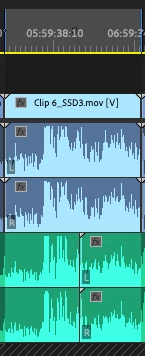
I could obviously cut the video clip at the audio clip break, and merge it as two separate clips, but I'd like to avoid this if possible.
I've messed around a bit with the Modify--> Audio channels... settings, and Sequence setttings for the nested clip, but can't seem to get this to work.
Anyone know how to get this to work? Or have ideas for achieving the same thing a different way?
Thanks,
Max
 AdChoices