pauls9016698
Participant
July 28, 2020
Answered

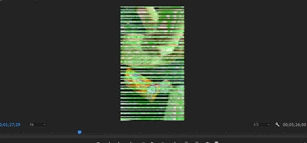
How to get rid of green/white lines
  • July 28, 2020
  • 2 replies
  • 1016 views

I am currently experiencing these green and white lines on all of my videos in Premiere Pro, is there any way that I can resolve this? It used to work fine on my laptop but I have opened today and it's showing this. 


I have tried following the steps on here: https://helpx.adobe.com/x-productkb/multi/drivers-video-win-intel.html but when I try to run the file, it says 'this computer does not meet the minimum requirements for installing the software'.


[Please do not double post, duplicate post deleted by mod]

This topic has been closed for replies.

2 replies

Peru Bob
Community Expert
Peru BobCommunity ExpertCorrect answer
Community Expert
July 28, 2020
pauls9016698
Participant
July 29, 2020

Amazing, that's worked, thank you for your help!

Peru Bob
Community Expert
Community Expert
July 29, 2020

You're welcome. 

Peru Bob
Community Expert
Community Expert
July 28, 2020

What graphics card(s) do you have?

What are the complete computer specs, including hard drives (how many, what kind, what is on each, and how full)?

pauls9016698
Participant
July 28, 2020

Graphics card is Intel(R) UHD Graphics 620

Intel(R) Core(TM) i7-8565U CPU

I have currently got my laptop plugged into a monitor screen, I think specs are as follows, apologies in advance, I am not the most technical!

I can see two disk drives, one model is VendorCo and the other says PC401 NVMe SK hynix 

VendorCo has 1 partition 

PC401 has 5 partitions