How to get rid of weird mask on lower thirds?
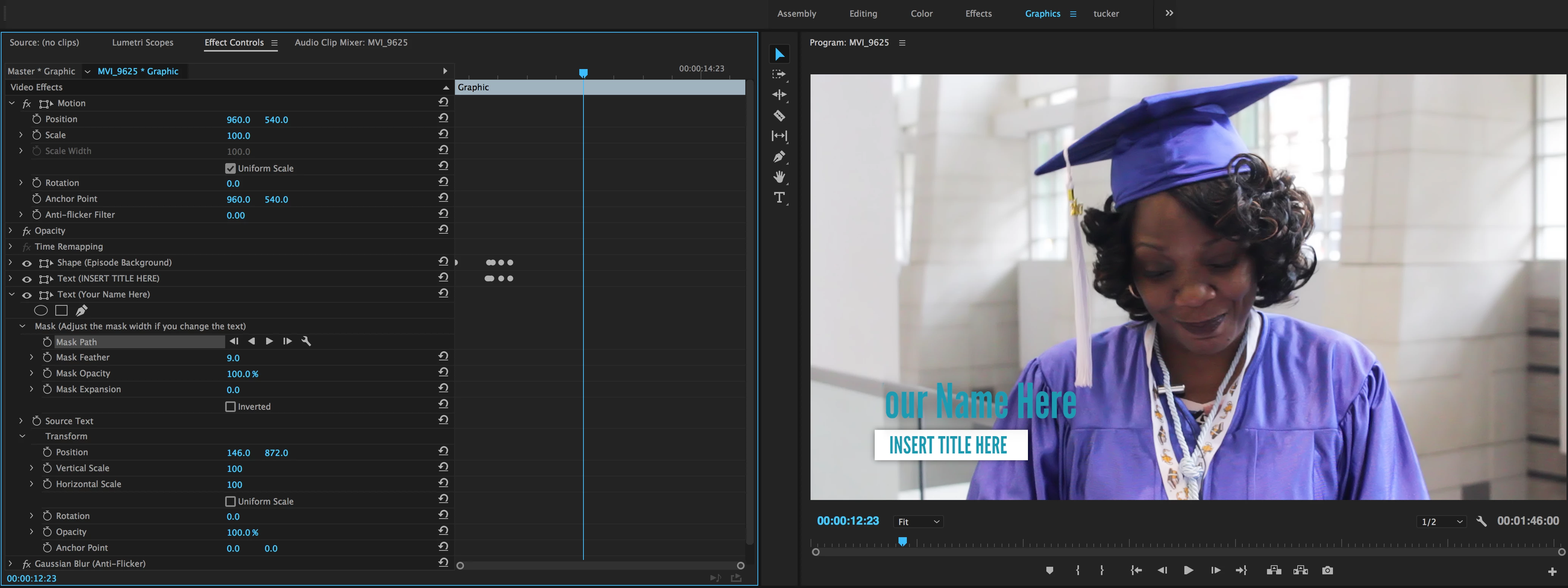
I'm experiencing something really odd with my lower third graphic that I've never encountered before in Premiere. I'm just using the modern lower third graphic that comes with Premiere Pro, but I'm never really a fan of the automatic placement so I always move it slightly once I've placed it on my video. Suddenly, I can't move it in any direction by more than a handful of pixels, or the text starts to disappear. I've looked and looked through both the Graphics panel and the Effect Controls, and I can find nothing that should be making this weird box/mask that restrains the lower third to a certain area. Even weirder to me is that I've used a handful of the lower third graphics that are built into Premiere, including this one, as recently as 2 days ago and I never had any issue moving them absolutely wherever I wanted. What could be making this happen? Note how the "Y" in the "Your Name Here" is cut off - that is where the left-hand side of this apparent box is. Anything beyond this is cut off.
*I am using Premiere Pro CC 2017.1.1 v11.0*
 AdChoices